Introduction into CRUD
What is Data Management and why does it matter?
In almost every software system you work with some kind of data - user accounts, products, sensor readings, configuration settings, etc. Data management is the process of safely storing, reading, changing, and removing that data. The four fundamental operations every data system must support are known as CRUD:
Create - adding new data
Retrieve (or Read) - fetching existing data
Update - modifying data
Delete - removing data
Testing these operations thoroughly is critical. A small bug in a Create or Update path can corrupt data, break downstream features, or expose security issues. That is exactly why automated, reusable CRUD tests are so valuable.
Balder - reusable testing across platforms
Balder is a Python test framework that lets you write a test once and reuse it across completely different platforms, devices, or applications (web, mobile, desktop, embedded systems, APIs, databases, …).
It achieves this through a clean separation:
Scenarios contain the abstract test logic (the “what” should happen).
Features (and Setups) contain the concrete implementation for your specific System Under Test (SUT) (the “how” it is done on this particular device/platform).
- BalderHub packages are the community / company library of ready-to-use Scenarios and Features. You simply
pip install them and plug in your own device-specific code.
How balderhub-crud implements CRUD testing
The balderhub-crud package is a BalderHub package that supplies everything you need to validate any kind of data with full CRUD support.
### Core components
Ready-to-use Scenarios (in
balderhub.crud.scenarios)Single-item operations:
ScenarioSingleCreate,ScenarioSingleRead,ScenarioSingleUpdateMulti-item operations:
ScenarioMultipleReadTriangle scenarios (advanced multi-device testing) - e.g. one device performs the modification while another device verifies the result. This is extremely powerful for distributed or client-server systems.
Feature classes (in
balderhub.crud.lib.scenario_featuresandsetup_features)SingleCreatorFeature,SingleReaderFeature,SingleUpdaterFeature,SingleDeleterFeatureMultipleReaderFeatureBase classes (BaseInteractorFeature, BaseCollectorFeature, …) that you can inherit from to build your own SUT-specific implementations.
Data modelling powered by balderhub-data
Uses Pydantic-style
DataItemmodels with clearly defined fields.Supports mandatory / optional fields, default values, and special markers:
UNSET: field may be missing or optionalNOT_DEFINABLE: field cannot be collected/verified on this device
Automatic example generation via
ExampleProviderandAutoSingleReadExampleFactoryclasses (valid data, invalid data, edge cases).
Validation & helpers
Before/after state checks (data consistency)
Error handling and success/failure message verification
Field-level comparison and diffing utilities
How a typical test flows (high-level)
You define your Devices (e.g.
DeviceUnderTestand optionally aPointOfTruthdevice).You attach the appropriate Features (the concrete CRUD methods for your SUT).
You run one of the pre-built Scenarios - Balder automatically wires everything together.
The scenario performs the operation and verifies the result against expected data.
Because the heavy lifting (scenario logic, data validation, example generation) is already done, you only need to implement the small SUT-specific parts. The same test code works for a REST API, a database, a file-based store, a mobile app backend - anywhere you manage data.
Current status & roadmap
Fully supported: Single Create, Single Read, Single Update, Multiple Read, Triangle variants
Work in progress: Multiple Create / Update / Delete, full Delete support
The package is under active development - contributions are very welcome!
Available CRUD Scenarios
The following section shows the requirements for the different existing scenarios.
SINGLE Create Scenarios
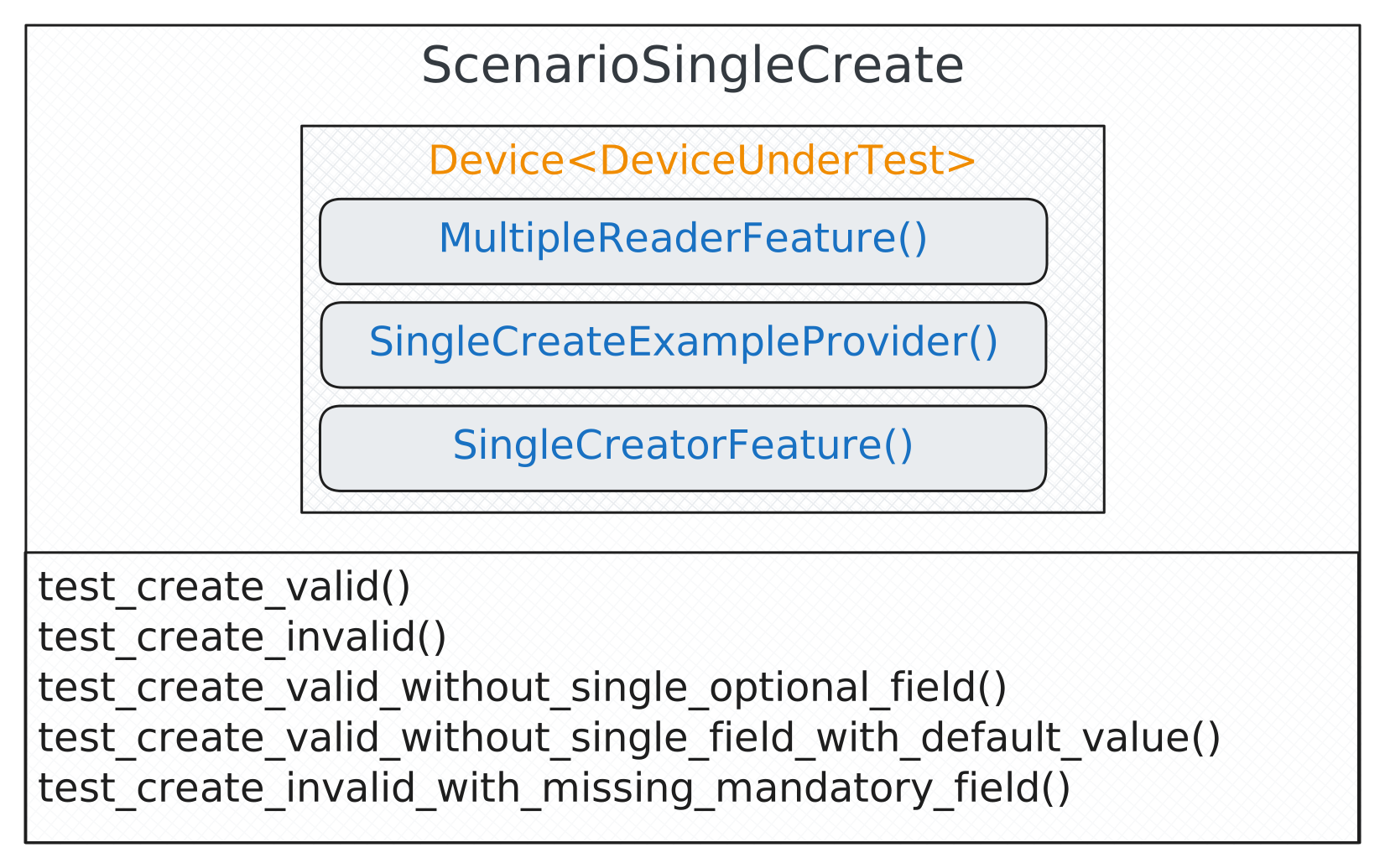
Note
This scenario is also available as Triangle version, see balderhub.crud.scenarios.ScenarioTriangleSingleCreate.
Scenario-Level-Feature |
Description / Setup-Level Feature Implementations |
|---|---|
Feature that creates the new data item in the system under test If you need this feature for a common application (django-admin, rest, odoo, nextcloud, ..) refer to the Ready-to-Use Implementation table table and look for an implementation of this feature in its contrib section. If you would like to use the ready-to-use scenario version of this
feature refer to Provide Custom Implementation of SingleCreatorFeature
You can also build this feature from scratch, for that, have a look at the scenario-level implementation at
|
|
Feature that provides the data items that should be newly created (valid/invalid) This feature normally need to be defined by yourself, it defines the field values that should be tried to create in the system under test. Have a look at Describing a new SINGLE CREATE EXAMPLE feature to see how this feature can be implemented. |
|
Feature allows to read back all data items from a specific type (used to check that new one was created successfully) If you need this feature for a common application (django-admin, rest, odoo, nextcloud, ..) refer to the Ready-to-Use Implementation table table and look for an implementation of this feature in its contrib section. If you would like to use the ready-to-use scenario version of this
feature refer to Provide Custom Implementation of MultipleReaderFeature
You can also build this feature from scratch, for that, have a look at the scenario-level implementation at
|
SINGLE Read Scenarios
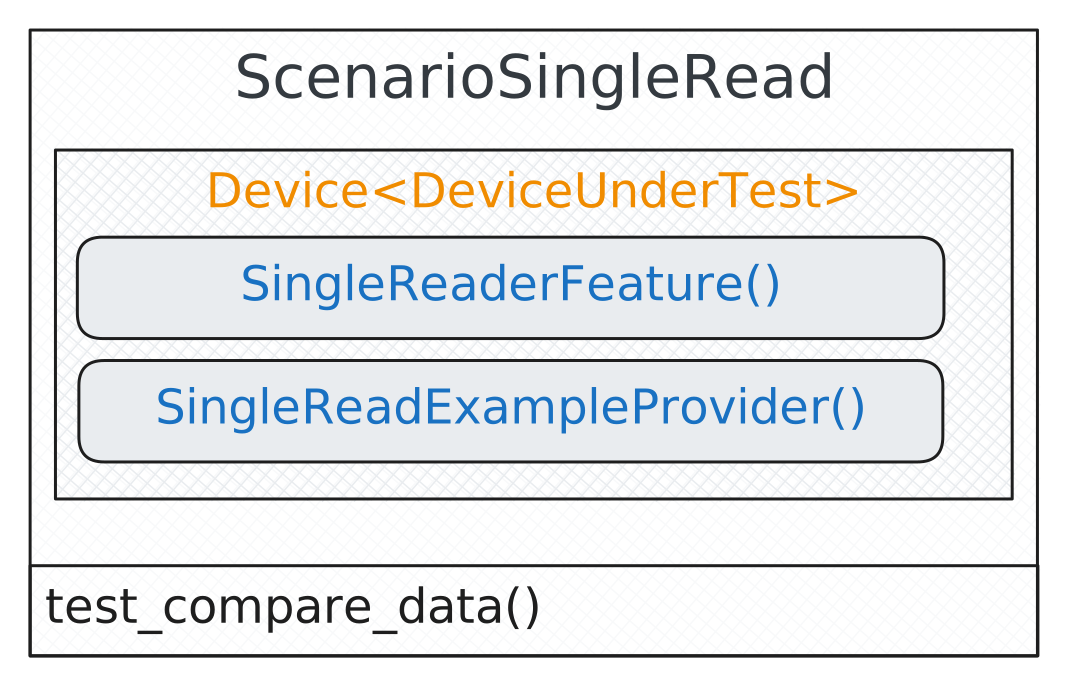
Scenario-Level-Feature |
Description / Setup-Level Feature Implementations |
|---|---|
Feature that reads a specific SINGLE data item in the device under test If you need this feature for a common application (django-admin, rest, odoo, nextcloud, ..) refer to the Ready-to-Use Implementation table table and look for an implementation of this feature in its contrib section. If you would like to use the ready-to-use scenario version of this
feature refer to Provide Custom Implementation of SingleReaderFeature
You can also build this feature from scratch, for that, have a look at the scenario-level implementation at
|
|
Feature that selects existing data items that should be read This feature is available as a factory implementation on scenario level
( |
SINGLE Update Scenarios
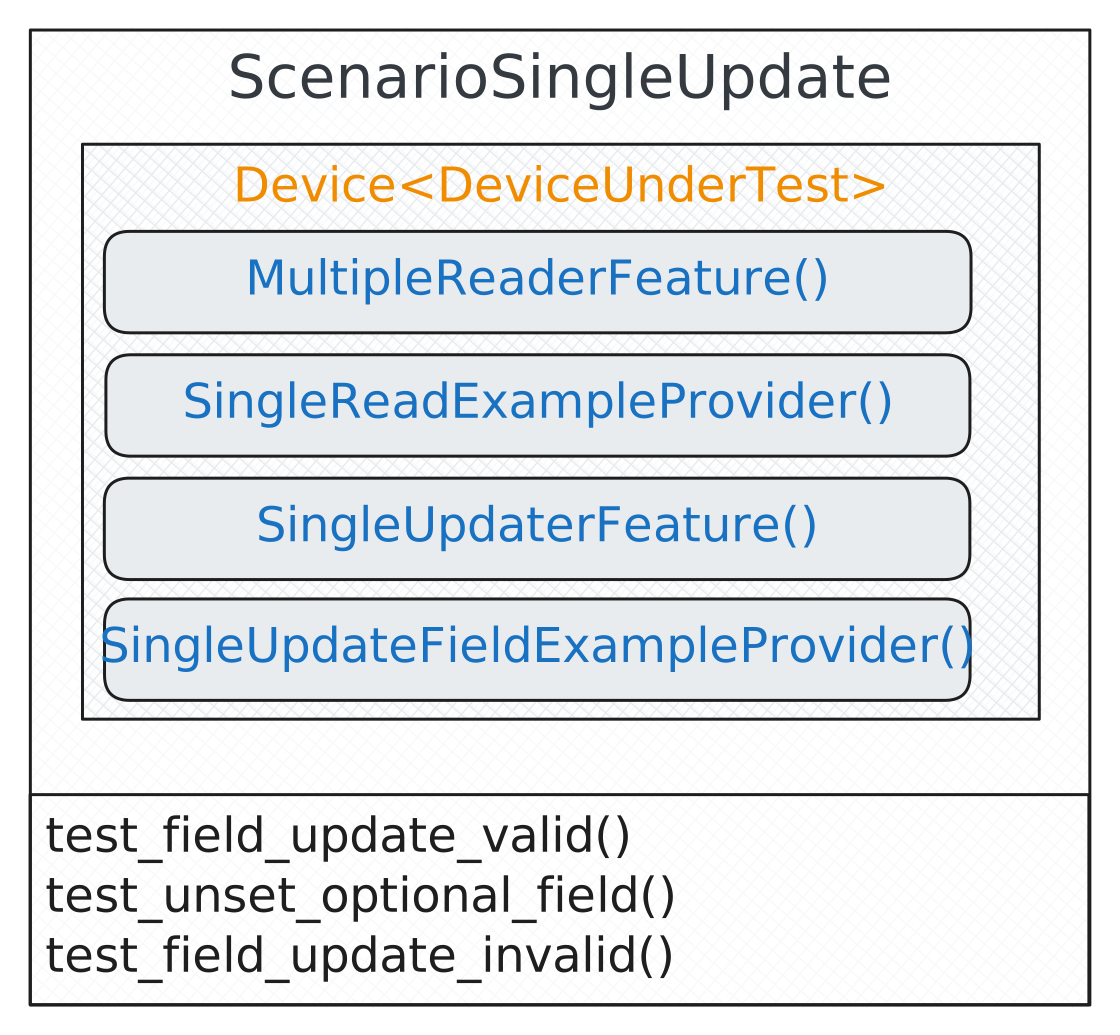
Scenario-Level-Feature |
Description / Setup-Level Feature Implementations |
|---|---|
Feature that updates an existing data item in the system under test If you need this feature for a common application (django-admin, rest, odoo, nextcloud, ..) refer to the Ready-to-Use Implementation table table and look for an implementation of this feature in its contrib section. If you would like to use the ready-to-use scenario version of this
feature refer to Provide Custom Implementation of SingleUpdaterFeature
You can also build this feature from scratch, for that, have a look at the scenario-level implementation at
|
|
Feature that selects existing data items that should be updated This feature is available as a factory implementation on scenario level
( |
|
Feature that defines the new value that should be set for a field for a specific data item This feature normally need to define by yourself, it defines the values that should be used during updating. Have a look at Describing a SINGLE UPDATE FIELD EXAMPLE feature to see how this feature can be implemented. |
|
Feature allows to read back all data items from a specific type (used to check that updated one was created successfully) If you need this feature for a common application (django-admin, rest, odoo, nextcloud, ..) refer to the Ready-to-Use Implementation table table and look for an implementation of this feature in its contrib section. If you would like to use the ready-to-use scenario version of this
feature refer to Provide Custom Implementation of MultipleReaderFeature
You can also build this feature from scratch, for that, have a look at the scenario-level implementation at
|
Note
This scenario is also available as Triangle version, see balderhub.crud.scenarios.ScenarioTriangleSingleUpdate.
SINGLE Delete Scenarios
Note
This scenario is still under development.
MULTIPLE Create Scenarios
Note
This scenario is still under development.
MULTIPLE Read Scenarios
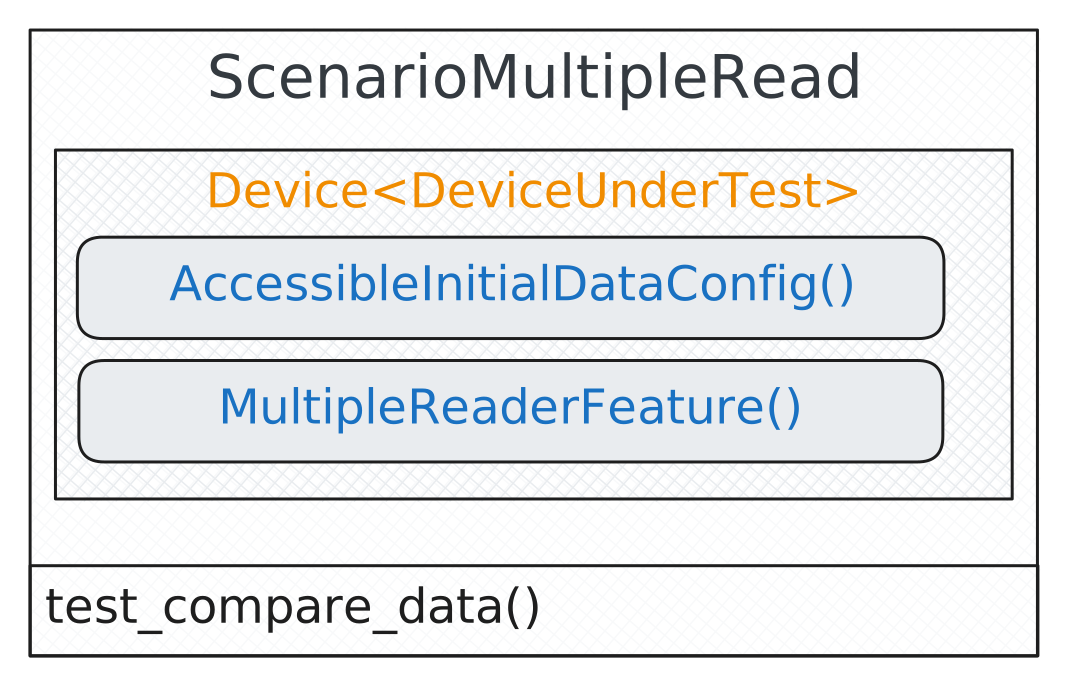
Scenario-Level-Feature |
Description / Setup-Level Feature Implementations |
|---|---|
Feature that reads all data items in the device under test If you need this feature for a common application (django-admin, rest, odoo, nextcloud, ..) refer to the Ready-to-Use Implementation table table and look for an implementation of this feature in its contrib section. If you would like to use the ready-to-use scenario version of this
feature refer to Provide Custom Implementation of MultipleReaderFeature
You can also build this feature from scratch, for that, have a look at the scenario-level implementation at
|
|
Feature that describes the initial data that is accessible This feature is available as a factory implementation on scenario level (see: Scenario-Level AutoAccessibleInitialDataConfigFactory in the balderhub-data package). and on setup level (see: Setup-Level AutoAccessibleInitialDataConfigFactory in the balderhub-data package). level. If you do not have any specific requirements to the data item that is read (except the possibilities provided by the factory - like FIRST, LAST, RANDOM) you can use the setup version of this factory directly within your setup |
MULTIPLE Update Scenarios
Note
This scenario is still under development.
MULTIPLE Delete Scenarios
Note
This scenario is still under development.
Ready-To-Use Feature Implementations
There are ready-to-use feature implementations for the CREATE/UPDATE/READ/DELETE features in other BalderHub packages. Refer to their CONTRIB documentation for how you can use these features.
Subproject |
Description |
Link DOC |
|---|---|---|
balderhub-django |
Ready To Use implementation for Django Admin - define a GeneralAdminModelConfig feature and some example picker features - everything else is already done |
|
balderhub-rest |
Ready To Use implementation for Default REST - define a GeneralRestModelConfig feature and some example picker features - everything else is already done |
|
balderhub-odoo (COMING SOON) |
Ready-to-use implementation for important Odoo models - describe your data environment and you’re ready to go |
|
balderhub-nextcloud (COMING SOON) |
Ready-to-use implementation for important Nextcloud models - describe your data environment and you’re ready to go |
If you would like to add your bindings to this table, feel free to reach out to us by creating an issue in balderhub-crud.
Next Steps
Installation: get the package running in minutes
Scenarios: see all available test scenarios
Features: explore the feature classes and example providers
Examples: concrete usage examples (including triangle scenarios)
Utilities: helper classes and data utilities
If you are new to Balder, we strongly recommend starting with the official Balder documentation.