Scenarios
Scenarios describe what you need. They define the tests and the necessary devices for them. Here you can find all scenarios that are implemented in this BalderHub package.
Every CREATE/UPDATE/DELETE scenario exists in two variants: a NORMAL version and a TRIANGLE version.
In the NORMAL version, a single device handles both the creation, updating and deletion of the data as well as reading the data back.
The TRIANGLE version differs in that it involves three devices. One device is responsible for creating, updating or deleting the data, while a second device reads the data bag. Both devices are connected to the device or system under test.
SINGLE Read Scenario
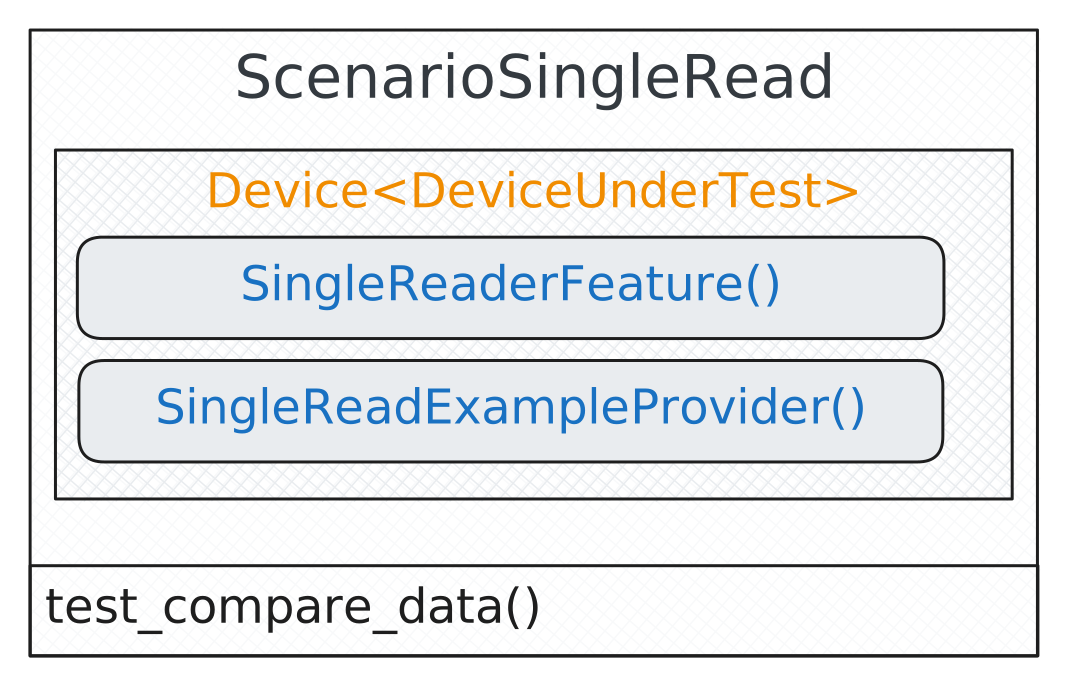
- class balderhub.crud.scenarios.ScenarioSingleRead
Bases:
ScenarioComparing test scenario that validates if a specific single data item is collectable with the
SingleDataReaderFeature.- class DeviceUnderTest
Bases:
Devicethe device under test at which we can read the specific data item
- example = <balderhub.crud.lib.scenario_features.single_read_example_provider.SingleReadExampleProvider object>
provides example data for an element that should be read and verified
- reader = <balderhub.crud.lib.scenario_features.single_reader_feature.SingleReaderFeature object>
allows to read the data for a single data item
- class PointOfTruth
Bases:
Devicepoint of truth - holds the specific data item
- test_compare_data(valid_example: NamedExample)
This is a simple comparing test. It reads a specific data item with its
SingleDataReaderFeatureand compares it with the expected data provided throughSingleDataConfig.The expected result is, that all collectable data fields are identically with the expected data items.
SINGLE Create Scenario
Normal SINGLE Create Scenario
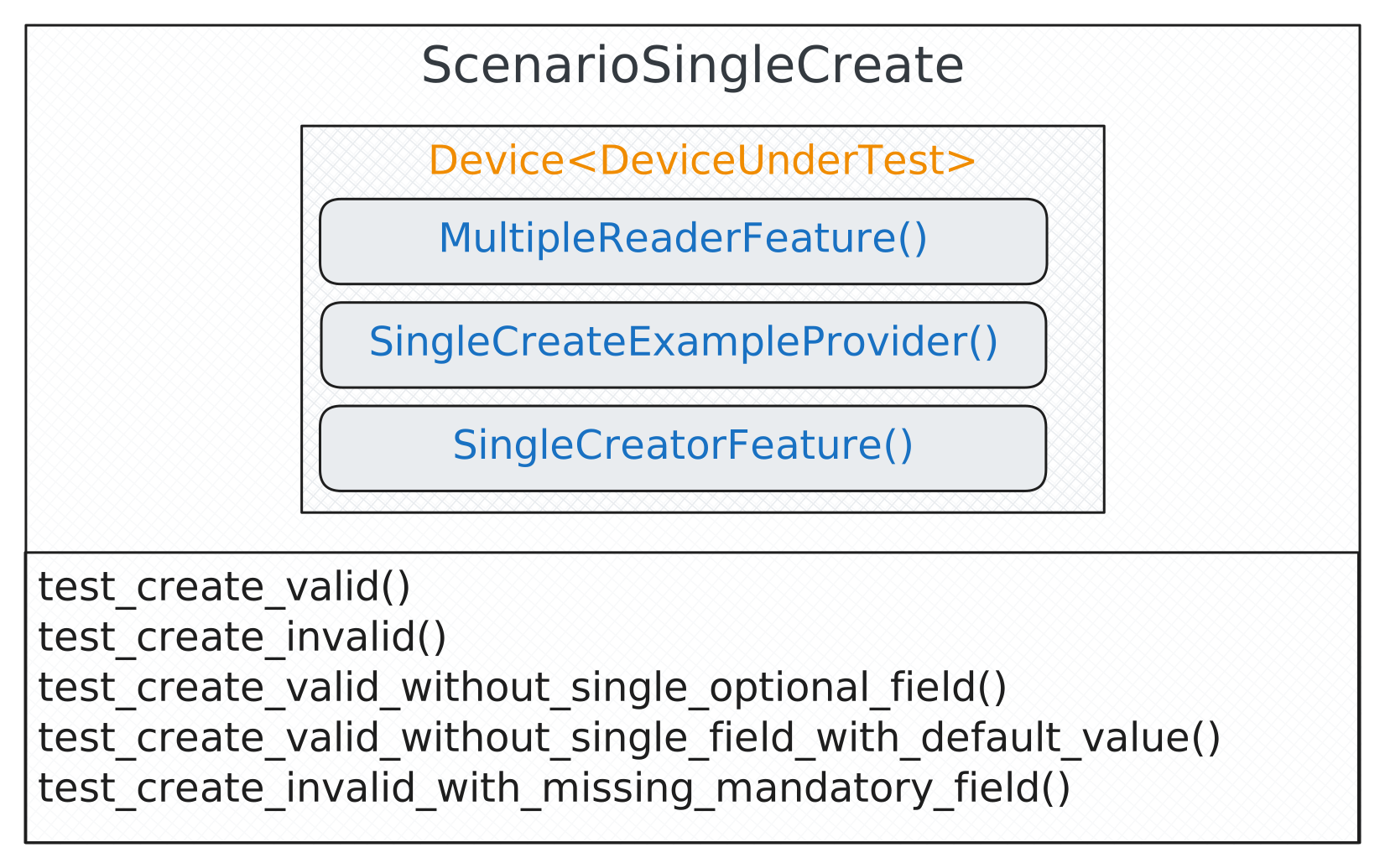
- class balderhub.crud.scenarios.ScenarioSingleCreate
Bases:
ScenarioCreating test scenario that creates a new element in the system-under-test. This test scenario is a two-devices scenario. The device-under-test reads the list of data and also creates the new data item. If you want to use a test scenario which splits this features into two separate devices, you can use the
ScenarioSingleCreateTriangle.- class DeviceUnderTest
Bases:
Devicethe device under test at which we can create the data list and specify the accessible data (f.e. because of permission restrictions or user-permission scoped data)
- creator = <balderhub.crud.lib.scenario_features.single_creator_feature.SingleCreatorFeature object>
can create a new data set in the system under test
- example = <balderhub.crud.lib.scenario_features.single_create_example_provider.SingleCreateExampleProvider object>
provides example data for a full new data item
- list_reader = <balderhub.crud.lib.scenario_features.multiple_reader_feature.MultipleReaderFeature object>
reads all existing accessible data
- class PointOfTruth
Bases:
Devicepoint of truth - holds all expected data
- test_create_invalid(invalid_example: NamedExample)
This test tries to create a new invalid data item in the device-under-test and makes sure that it was not created. It also validates that the correct error messages were returned by the system and that the previous existing data does not change during this failed-creation.
- Parameters:
invalid_example – the parametrized invalid example (provided by
ExampleDataProviderFeature.get_invalid_examples())
- test_create_invalid_with_missing_mandatory_field(without_mandatory_field: str)
This test tries to create a new data item in the device-under-test without a mandatory field. It uses the first valid example provided by
ExampleDataProviderFeature.get_valid_examples(), but without one field given by without_mandatory_field (provided withSingleDataCreatorFeature.resolved_mandatory_fields(). This is expected to result into an error, which will be also verified.The test checks that all fillable and collectable data fields before and after the failing creation is valid (does not change and no data item is added).
Note
This test is an auto parametrized test. It uses dynamical parametrization and asks the setup feature version of
SingleDataCreatorFeaturefor all existing mandatory fields and performs the test for each of these fields.It does this individually for each field. There is currently no scenario that does this with multiple fields at the same time. If you need such a test, you will have to implement it individually.
- Parameters:
without_mandatory_field – parametrized mandatory field name (provided by
SingleDataCreatorFeature.resolved_mandatory_fields())
- test_create_valid(valid_example: NamedExample)
This test creates a new data item in the device-under-test and validates its creation. It checks all fillable and collectable data fields before and after the new data item was created. It makes sure that only one data with the correct field values was created.
- Parameters:
valid_example – parametrized valid example (provided by
ExampleDataProviderFeature.get_valid_examples())
- test_create_valid_without_single_field_with_default_value(without_field: str)
This test creates a new data item in the device-under-test and validates its creation. It uses the first valid example provided by
ExampleDataProviderFeature.get_valid_examples(), but without one field given by without_field (provided withSingleDataCreatorFeature.resolved_fields_with_default_values(). This is expected to run successfully without any error.The test checks that all fillable and collectable data fields before and after the new data item was created. It makes sure that only one data item and also with the correct field values was created. It also validates that the non-filled default value has the expected default value.
Note
This test is an auto parametrized test. It uses dynamical parametrization and asks the setup feature version of
SingleDataCreatorFeaturefor all existing fields with default values and performs the test for each field with a default value.It does this individually for each field. There is currently no scenario that does this with multiple fields at the same time. If you need such a test, you will have to implement it individually.
- Parameters:
without_field – parametrized optional field name (provided by
SingleDataCreatorFeature.resolved_fields_with_default_values())
- test_create_valid_without_single_optional_field(without_optional_field: str)
This test creates a new data item in the device-under-test and validates its creation. It uses the first valid example provided by
ExampleDataProviderFeature.get_valid_examples(), but without one optional field given by without_optional_field (provided withSingleDataCreatorFeature.resolved_optional_fields(). This is expected to run successfully without any error. The test checks that the data items before and after the creation don’t change (all fillable and collectable data fields were checked here). It makes sure that only one data item and also with the correct field values was created.Note
This test is an auto parametrized test. It uses dynamical parametrization and asks the setup feature version of
SingleDataCreatorFeaturefor all existing optional fields and performs the test for each optional field.It does this individually for each field. There is currently no scenario that does this with multiple optional fields at the same time. If you need such a test, you will have to implement it individually.
Note
At the moment this feature does not validate the optional field (the value will be set to NOT_DEFINABLE).
- Parameters:
without_optional_field – parametrized optional field name (provided by
SingleDataCreatorFeature.resolved_optional_fields())
Triangle SINGLE Create Scenario
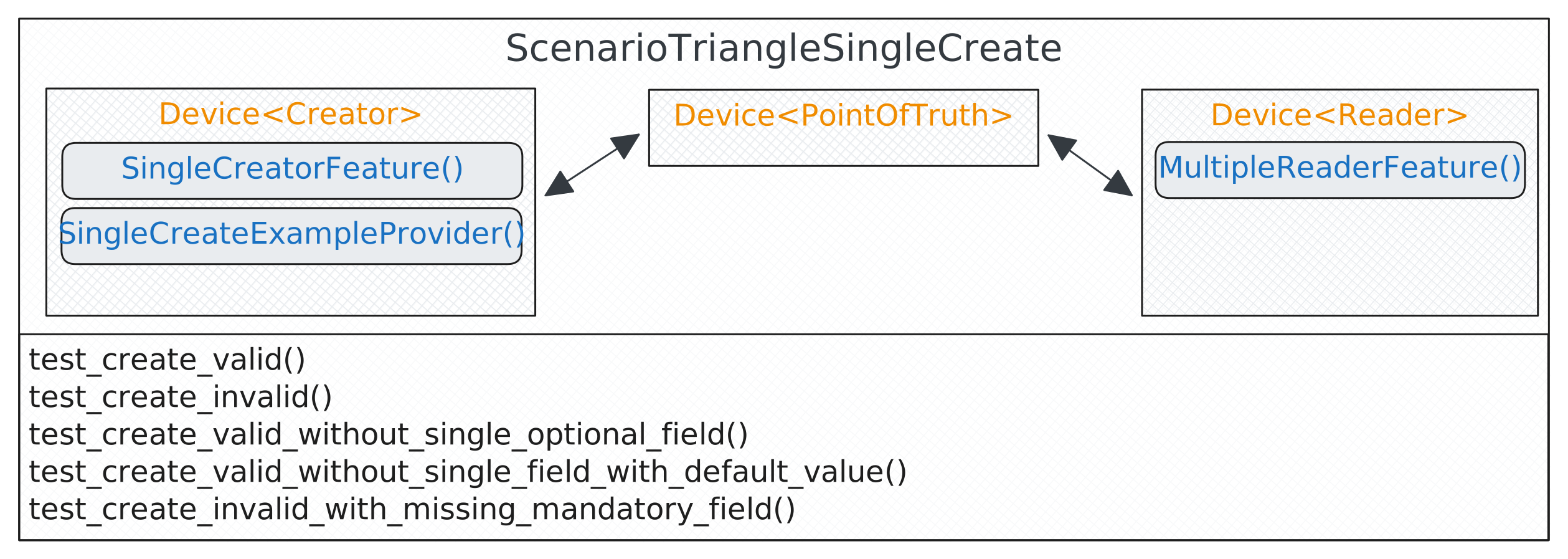
- class balderhub.crud.scenarios.ScenarioTriangleSingleCreate
Bases:
ScenarioCreating test scenario that creates a new element in the system-under-test. This test scenario is a triangle-device scenario. One device reads the data and the other device creates it. If you want to use a test scenario which uses only one single device for reading and writing, you can use the
ScenarioSingleCreate.- class Creator
Bases:
Devicethe device under test that can create a new data item
- creator = <balderhub.crud.lib.scenario_features.single_creator_feature.SingleCreatorFeature object>
can create a new data set in the system under test
- example = <balderhub.crud.lib.scenario_features.single_create_example_provider.SingleCreateExampleProvider object>
provides example data for a full new data item
- class PointOfTruth
Bases:
Devicepoint of truth - holds all expected data
- class Reader
Bases:
Devicethe device that can read the data item list
- list_reader = <balderhub.crud.lib.scenario_features.multiple_reader_feature.MultipleReaderFeature object>
reads all existing accessible data
- test_create_invalid(invalid_example: NamedExample)
This test tries to create a new invalid data item in the device-under-test and makes sure that it was not created. It also validates that the correct error messages were returned by the system and that the previous existing data does not change during this failed-creation.
- Parameters:
invalid_example – the parametrized invalid example (provided by
ExampleDataProviderFeature.get_invalid_examples())
- test_create_invalid_with_missing_mandatory_field(without_mandatory_field: str)
This test tries to create a new data item in the device-under-test without a mandatory field. It uses the first valid example provided by
ExampleDataProviderFeature.get_valid_examples(), but without one field given by without_mandatory_field (provided withSingleDataCreatorFeature.resolved_mandatory_fields(). This is expected to result into an error, which will be also verified.The test checks that all fillable and collectable data fields before and after the failing creation is valid (does not change and no data item is added).
Note
This test is an auto parametrized test. It uses dynamical parametrization and asks the setup feature version of
SingleDataCreatorFeaturefor all existing mandatory fields and performs the test for each of these fields.It does this individually for each field. There is currently no scenario that does this with multiple fields at the same time. If you need such a test, you will have to implement it individually.
- Parameters:
without_mandatory_field – parametrized mandatory field name (provided by
SingleDataCreatorFeature.resolved_mandatory_fields())
- test_create_valid(valid_example: NamedExample)
This test creates a new data item in the device-under-test and validates its creation. It checks all fillable and collectable data fields before and after the new data item was created. It makes sure that only one data with the correct field values was created.
- Parameters:
valid_example – parametrized valid example (provided by
ExampleDataProviderFeature.get_valid_examples())
- test_create_valid_without_single_field_with_default_value(without_field: str)
This test creates a new data item in the device-under-test and validates its creation. It uses the first valid example provided by
ExampleDataProviderFeature.get_valid_examples(), but without one field given by without_field (provided withSingleDataCreatorFeature.resolved_fields_with_default_values(). This is expected to run successfully without any error.The test checks that the data items before and after the creation don’t change (all fillable and collectable data fields were checked here). It makes sure that only one data item and also with the correct field values was created. It also validates that the non-filled default value has the expected default value.
Note
This test is an auto parametrized test. It uses dynamical parametrization and asks the setup feature version of
SingleDataCreatorFeaturefor all existing fields with default values and performs the test for each field with a default value.It does this individually for each field. There is currently no scenario that does this with multiple fields at the same time. If you need such a test, you will have to implement it individually.
- Parameters:
without_field – parametrized optional field name (provided by
SingleDataCreatorFeature.resolved_fields_with_default_values())
- test_create_valid_without_single_optional_field(without_optional_field: str)
This test creates a new data item in the device-under-test and validates its creation. It uses the first valid example provided by
ExampleDataProviderFeature.get_valid_examples(), but without one optional field given by without_optional_field (provided withSingleDataCreatorFeature.resolved_optional_fields(). This is expected to run successfully without any error. The test checks that the data items before and after the creation also don’t change (all fillable and collectable data fields were checked here). It makes sure that only one data item and also with the correct field values was created.Note
This test is an auto parametrized test. It uses dynamical parametrization and asks the setup feature version of
SingleDataCreatorFeaturefor all existing optional fields and performs the test for each optional field.It does this individually for each field. There is currently no scenario that does this with multiple optional fields at the same time. If you need such a test, you will have to implement it individually.
Note
At the moment this feature does not validate the optional field (the value will be set to NOT_DEFINABLE).
- Parameters:
without_optional_field – parametrized optional field name (provided by
SingleDataCreatorFeature.resolved_optional_fields())
SINGLE Update Scenario
Normal SINGLE Update Scenario
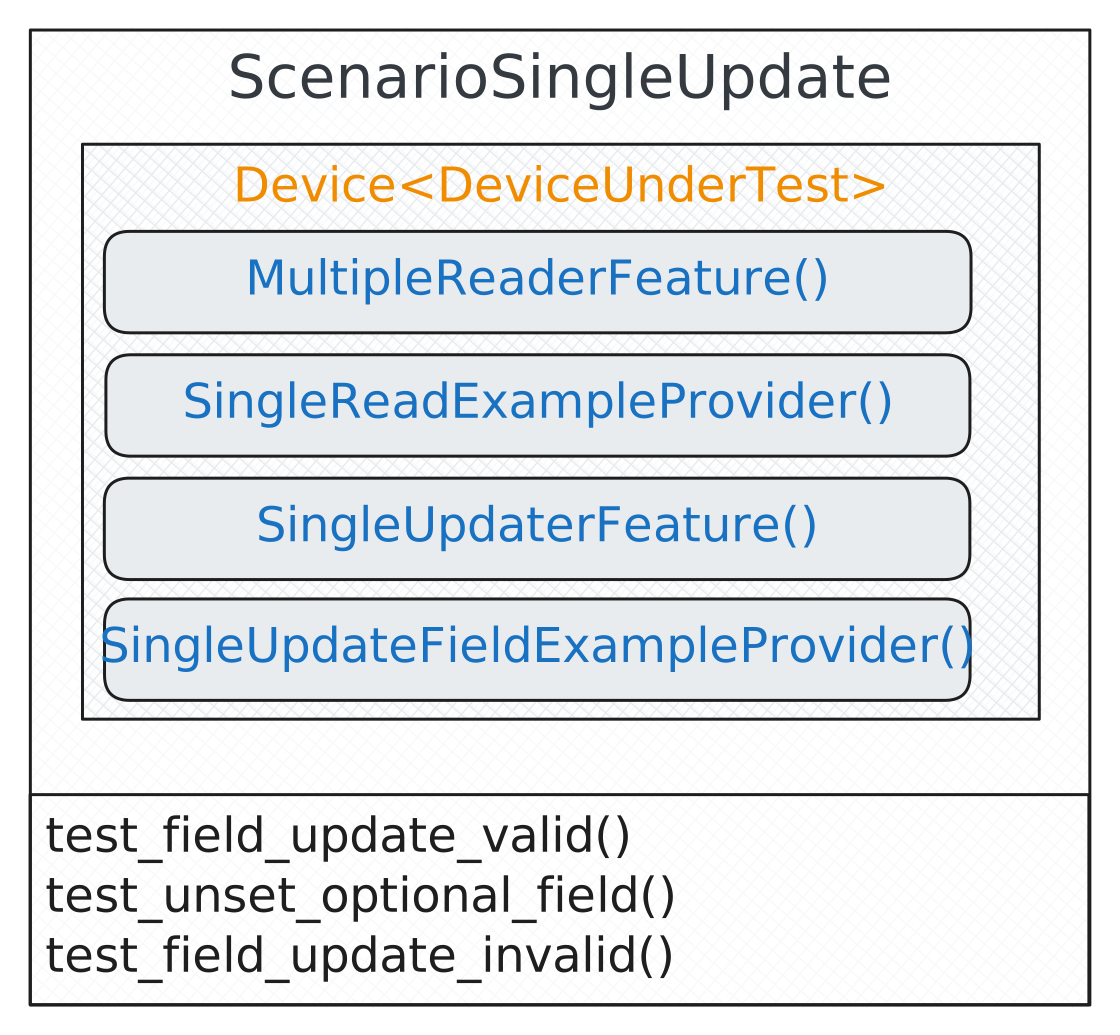
- class balderhub.crud.scenarios.ScenarioSingleUpdate
Bases:
ScenarioUpdating test scenario that validates if field updates for a specific item are possible.
- class DeviceUnderTest
Bases:
Devicethe device under test at which we can read the data list and update a specific data item (f.e. because of permission restrictions or user-permission scoped data)
- class PointOfTruth
Bases:
Devicepoint of truth - holds all expected data
- test_field_update_invalid(cur_fillable_field: str, invalid_example: NamedExample)
This test tries to update fields with illegal field values. It will be expected that this is not possible and the device-under-tests provides an expected error message.
This test will be auto parametrized and executed for all updatable fields. It is multiple parametrized and will automatically be called once per field and per configured field value (provided by
SingleUpdateFieldExampleProvider.get_invalid_new_value_for_field())- Parameters:
cur_fillable_field – the parametrized field that should be updated with this test run (provided by
SingleUpdaterFeature.resolved_fillable_fields()invalid_example – the parametrized dependent illegal field-value (provided by
SingleUpdateFieldExampleProvider.get_invalid_new_value_for_field()) for the current field (provided with parameter cur_fillable_field)
- test_field_update_valid(cur_fillable_field: str, valid_example: NamedExample)
This test tries to update fields. It will be auto parametrized and executed for all updatable fields. It is multiple parametrized and will automatically be called once per field and per configured field value (provided by
SingleUpdateFieldExampleProvider.get_valid_new_value_for_field())- Parameters:
cur_fillable_field – the parametrized field that should be updated with this test run (provided by
SingleUpdaterFeature.resolved_fillable_fields()valid_example – the parametrized dependent field-value (provided by
SingleUpdateFieldExampleProvider.get_valid_new_value_for_field()) for the current field (provided with parameter cur_fillable_field)
- test_unset_optional_field(unset_optional_field)
This test tries to UNSET an existing field that is marked as optional. It will be auto parametrized and executed for all optional fields (provided by
SingleUpdaterFeature.resolved_optional_fields()).- Parameters:
unset_optional_field – parametrized optional field name (provided by
SingleUpdaterFeature.resolved_optional_fields())
Triangle SINGLE Update Scenario
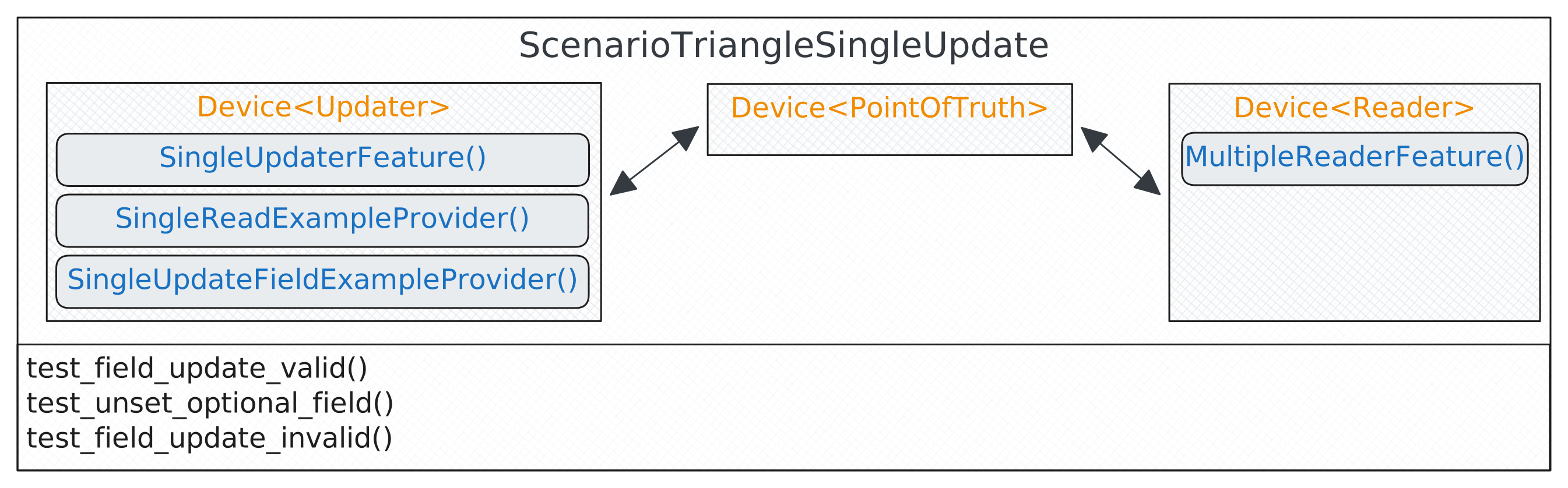
- class balderhub.crud.scenarios.ScenarioTriangleSingleUpdate
Bases:
ScenarioUpdating test scenario that validates if field updates for a specific item are possible.
- class PointOfTruth
Bases:
Devicepoint of truth - holds all expected data
- class Reader
Bases:
Devicethe device that can read the data item list
- list_reader = <balderhub.crud.lib.scenario_features.multiple_reader_feature.MultipleReaderFeature object>
reads all existing accessible data
- class Updater
Bases:
Devicethe device under test that can update a new data item
- example = <balderhub.crud.lib.scenario_features.single_update_field_example_provider.SingleUpdateFieldExampleProvider object>
provides example data for the selected entry
- single_example = <balderhub.crud.lib.scenario_features.single_read_example_provider.SingleReadExampleProvider object>
can select one of the existing entries
- updater = <balderhub.crud.lib.scenario_features.single_updater_feature.SingleUpdaterFeature object>
can update a data set in the system under test
- test_field_update_invalid(cur_fillable_field: str, invalid_example: NamedExample)
This test tries to update fields with illegal field values. It will be expected that this is not possible and the device-under-tests provides an expected error message.
This test will be auto parametrized and executed for all updatable fields. It is multiple parametrized and will automatically be called once per field and per configured field value (provided by
SingleUpdateFieldExampleProvider.get_invalid_new_value_for_field())- Parameters:
cur_fillable_field – the parametrized field that should be updated with this test run (provided by
SingleUpdaterFeature.resolved_fillable_fields()invalid_example – the parametrized dependent illegal field-value (provided by
SingleUpdateFieldExampleProvider.get_invalid_new_value_for_field()) for the current field (provided with parameter cur_fillable_field)
- test_field_update_valid(cur_fillable_field: str, valid_example: NamedExample)
This test tries to update fields. It will be auto parametrized and executed for all updatable fields. It is multiple parametrized and will automatically be called once per field and per configured field value (provided by
SingleUpdateFieldExampleProvider.get_valid_new_value_for_field())- Parameters:
cur_fillable_field – the parametrized field that should be updated with this test run (provided by
SingleUpdaterFeature.resolved_fillable_fields()valid_example – the parametrized dependent field-value (provided by
SingleUpdateFieldExampleProvider.get_valid_new_value_for_field()) for the current field (provided with parameter cur_fillable_field)
- test_unset_optional_field(unset_optional_field)
This test tries to UNSET an existing field that is marked as optional. It will be auto parametrized and executed for all optional fields (provided by
SingleUpdaterFeature.resolved_optional_fields()).- Parameters:
unset_optional_field – parametrized optional field name (provided by
SingleUpdaterFeature.resolved_optional_fields())
SINGLE Delete Scenario
Note
The DELETION scenarios are not fully developed.
MULTIPLE Read Scenario
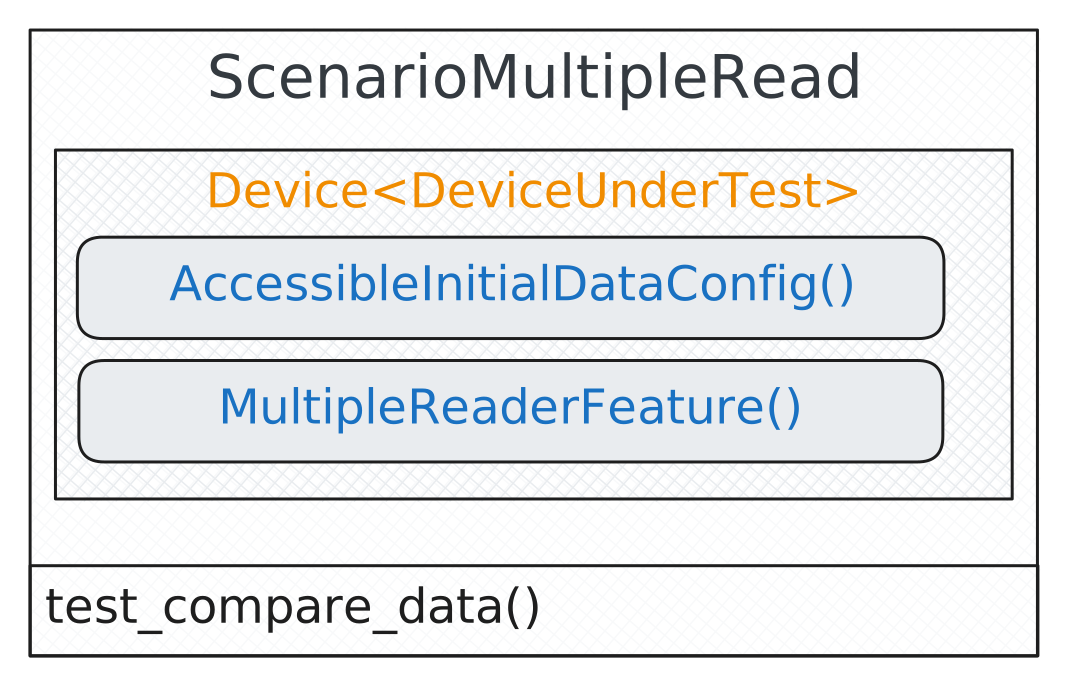
- class balderhub.crud.scenarios.ScenarioMultipleRead
Bases:
ScenarioComparing test scenario that validates if accessible data is collectable with the
MultipleDataReaderFeature.- class DeviceUnderTest
Bases:
Devicethe device under test at which we can read the data list and specify the accessible data (f.e. because of permission restrictions or user-permission scoped data)
- class PointOfTruth
Bases:
Devicepoint of truth - holds all expected data
- test_compare_data()
This is a simple comparing test. It reads all visible with its
MultipleDataReaderFeatureand compares it with the expected data provided throughAccessibleMultipleDataConfig.The expected result is, that all collectable data fields are identically with the expected data items.
MULTIPLE Create Scenario
Note
The MULTIPLE CREATE scenarios are not fully developed.
MULTIPLE Update Scenario
Note
The MULTIPLE UPDATE scenarios are not fully developed.
MULTIPLE Delete Scenario
Note
The DELETION scenarios are not fully developed.