Examples
This package provides ready to use scenarios for testing CRUD operations like CREATING, UPDATING, RETRIEVING and DELETING with a single or with multiple elements.
Defining the Data Model Structure
Before creating any CRUD setups, you need to make sure that you have defined an own data environment. This needs to be done by using the balderhub-data SingleItemData objects. It could look like the example shown below:
from typing import Optional
from balderhub.data.lib.utils import SingleDataItem


class AuthorDataItem(SingleDataItem):
    id: int
    first_name: str
    last_name: str

    def get_unique_identification(self):
        return self.id

class BookCategoryDataItem(SingleDataItem):
    id: int
    name: str

    def get_unique_identification(self):
        return self.id


class BookDataItem(SingleDataItem):
    id: int
    title: str
    author: AuthorDataItem
    category: Optional[BookCategoryDataItem] = None

    def get_unique_identification(self):
        return self.id
For more information about describing data environment, see balderhub-data project documentation.
Requirements to run CRUD Scenarios
The following section shows the requirements for the different existing scenarios.
This setup example is an example for testing CREATE, UPDATE, SINGLE-READ and MULTIPLE-READ within one setup:
import balder

import balderhub.data.lib.setup_features.factories
import balderhub.crud.lib.setup_features.factories

from tests.lib.setup_features.data import book
from tests.lib.utils.data_items import BookDataItem
from tests.lib.setup_features.data_environment_feature import TestDataEnvironment
from tests.lib.setup_features.dut_simulator_feature import DutSimulatorFeature


class SetupBook(balder.Setup):

    class Dut(balder.Device):
        sim = DutSimulatorFeature()
        env = TestDataEnvironment()
        initial_data = balderhub.data.lib.setup_features.factories.AutoInitialDataConfigFactory.get_for(BookDataItem)()

    @balder.connect(Dut, over_connection=balder.Connection)
    class Client(balder.Device):
        accessible_data = balderhub.data.lib.setup_features.factories.AutoAccessibleInitialDataConfigFactory.get_for(BookDataItem)(Master='Dut')
        reader = book.SingleBookReader(Dut='Dut')
        multiple_reader = book.MultipleBookReader(Dut='Dut')
        creator = book.SingleBookCreator(Dut='Dut')
        updator = book.SingleBookUpdator(Dut='Dut')
        deleter = book.SingleBookDeleter(Dut='Dut')
        create_example = book.ExampleCreateBookProvider(Dut='Dut')
        read_example = balderhub.crud.lib.setup_features.factories.AutoSingleReadExampleFactory.get_for(BookDataItem, return_style='first')()
        update_example = book.ExampleUpdateBookFieldProvider()
The following subsections show the minimum requirements to run the specific scenarios.
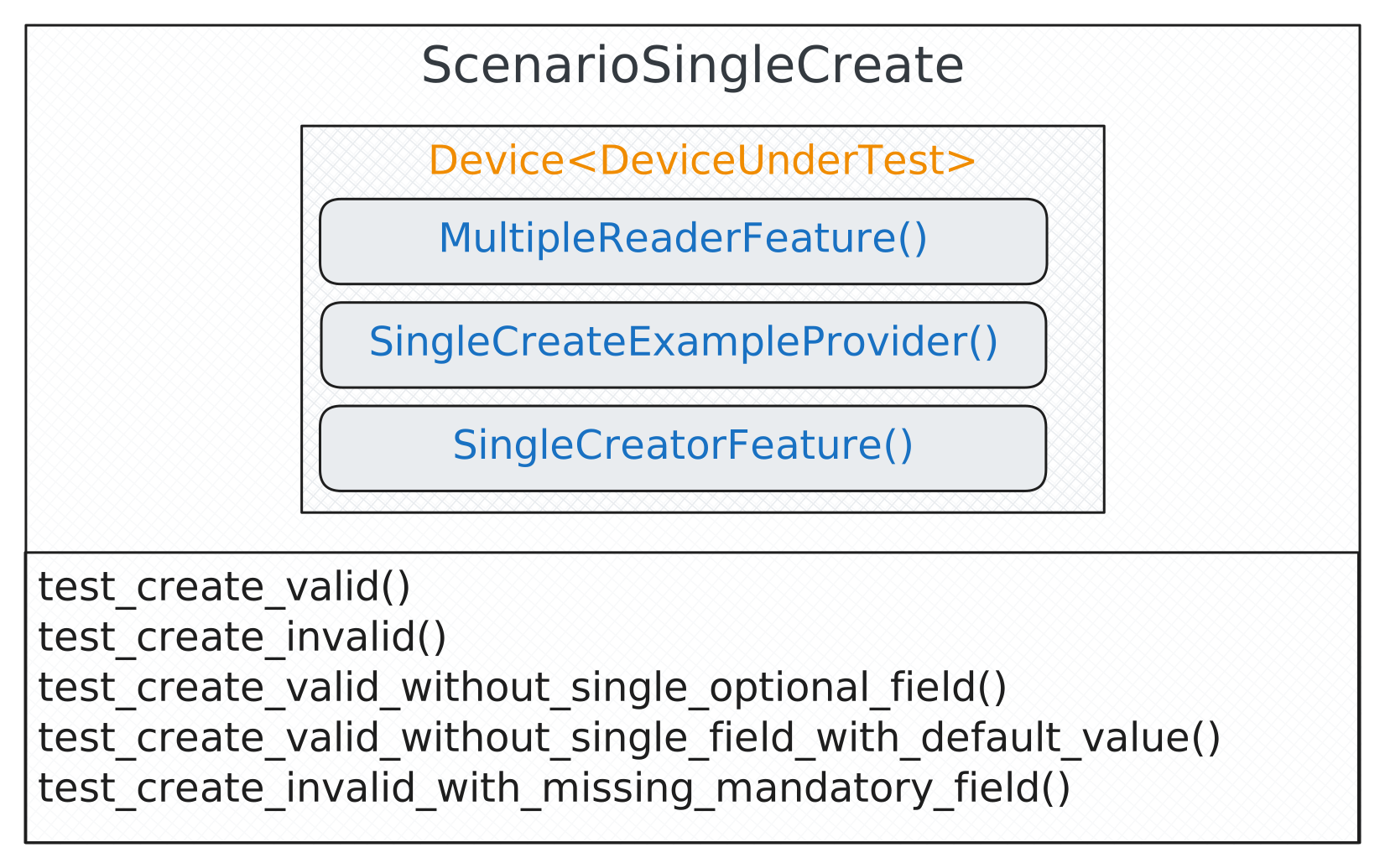
SINGLE Create
Note
This scenario is also available as Triangle version, see balderhub.crud.scenarios.ScenarioTriangleSingleCreate.
Scenario-Level-Feature |
Description / Setup-Level Feature Implementations |
|---|---|
Feature that creates the new data item in the system under test If you need this feature for a common application (django-admin, rest, odoo, nextcloud, ..) refer to the Contributions/Implementations table table and look for an implementation of this feature in its contrib section. If you would like to use the ready-to-use scenario version of this
feature refer to Provide Custom Implementation of SingleCreatorFeature
You can also build this feature from scratch, for that, have a look at the scenario-level implementation at
|
|
Feature that provides the data items that should be newly created (valid/invalid) This feature normally need to be defined by yourself, it defines the field values that should be tried to create in the system under test. Have a look at Describing a new SINGLE CREATE EXAMPLE feature to see how this feature can be implemented. |
|
Feature allows to read back all data items from a specific type (used to check that new one was created successfully) If you need this feature for a common application (django-admin, rest, odoo, nextcloud, ..) refer to the Contributions/Implementations table table and look for an implementation of this feature in its contrib section. If you would like to use the ready-to-use scenario version of this
feature refer to Provide Custom Implementation of MultipleReaderFeature
You can also build this feature from scratch, for that, have a look at the scenario-level implementation at
|
Example Setup:
import balder

import balderhub.data.lib.setup_features.factories
import balderhub.crud.lib.setup_features.factories

from tests.lib.setup_features.data import book
from tests.lib.utils.data_items import BookDataItem
from tests.lib.setup_features.data_environment_feature import TestDataEnvironment
from tests.lib.setup_features.dut_simulator_feature import DutSimulatorFeature


class SetupBook(balder.Setup):

    class Dut(balder.Device):
        sim = DutSimulatorFeature()
        env = TestDataEnvironment()
        initial_data = balderhub.data.lib.setup_features.factories.AutoInitialDataConfigFactory.get_for(BookDataItem)()

    @balder.connect(Dut, over_connection=balder.Connection)
    class Client(balder.Device):
        accessible_data = balderhub.data.lib.setup_features.factories.AutoAccessibleInitialDataConfigFactory.get_for(BookDataItem)(Master='Dut')
        multiple_reader = book.MultipleBookReader(Dut='Dut')
        creator = book.SingleBookCreator(Dut='Dut')
        create_example = book.ExampleCreateBookProvider(Dut='Dut')
SINGLE Read
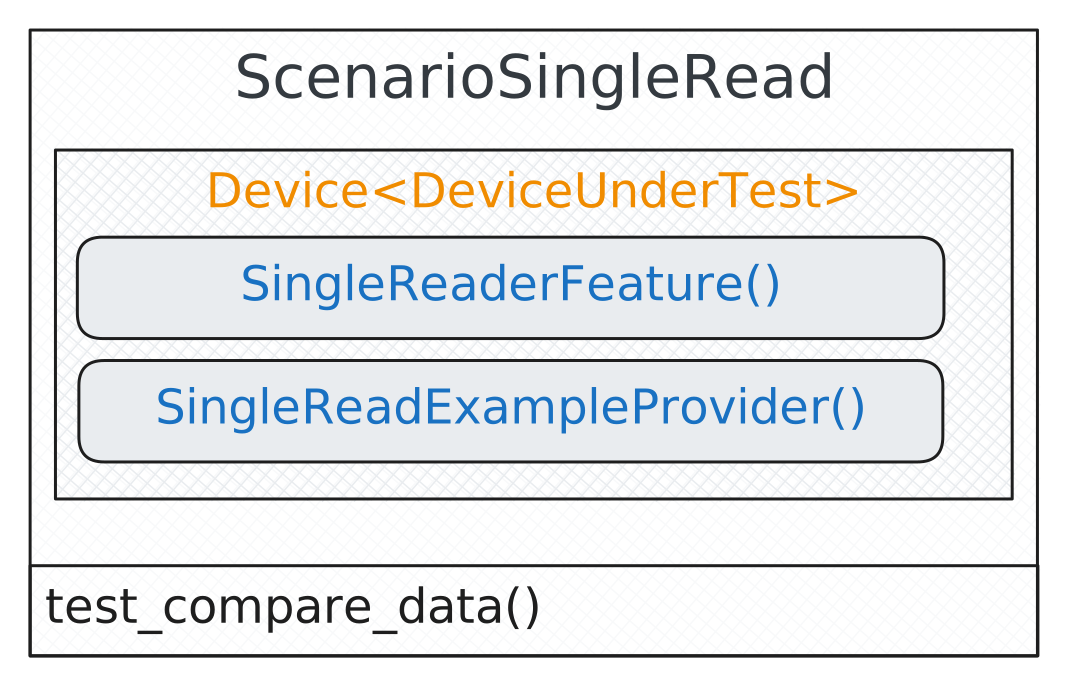
Scenario-Level-Feature |
Description / Setup-Level Feature Implementations |
|---|---|
Feature that reads a specific SINGLE data item in the device under test If you need this feature for a common application (django-admin, rest, odoo, nextcloud, ..) refer to the Contributions/Implementations table table and look for an implementation of this feature in its contrib section. If you would like to use the ready-to-use scenario version of this
feature refer to Provide Custom Implementation of SingleReaderFeature
You can also build this feature from scratch, for that, have a look at the scenario-level implementation at
|
|
Feature that selects existing data items that should be read This feature is available as a factory implementation on scenario level
( |
Example Setup:
import balder

import balderhub.data.lib.setup_features.factories
import balderhub.crud.lib.setup_features.factories

from tests.lib.setup_features.data import book
from tests.lib.utils.data_items import BookDataItem
from tests.lib.setup_features.data_environment_feature import TestDataEnvironment
from tests.lib.setup_features.dut_simulator_feature import DutSimulatorFeature


class SetupBook(balder.Setup):

    class Dut(balder.Device):
        sim = DutSimulatorFeature()
        env = TestDataEnvironment()
        initial_data = balderhub.data.lib.setup_features.factories.AutoInitialDataConfigFactory.get_for(BookDataItem)()

    @balder.connect(Dut, over_connection=balder.Connection)
    class Client(balder.Device):
        accessible_data = balderhub.data.lib.setup_features.factories.AutoAccessibleInitialDataConfigFactory.get_for(BookDataItem)(Master='Dut')
        reader = book.SingleBookReader(Dut='Dut')
        read_example = balderhub.crud.lib.setup_features.factories.AutoSingleReadExampleFactory.get_for(BookDataItem, return_style='first')()
SINGLE Update
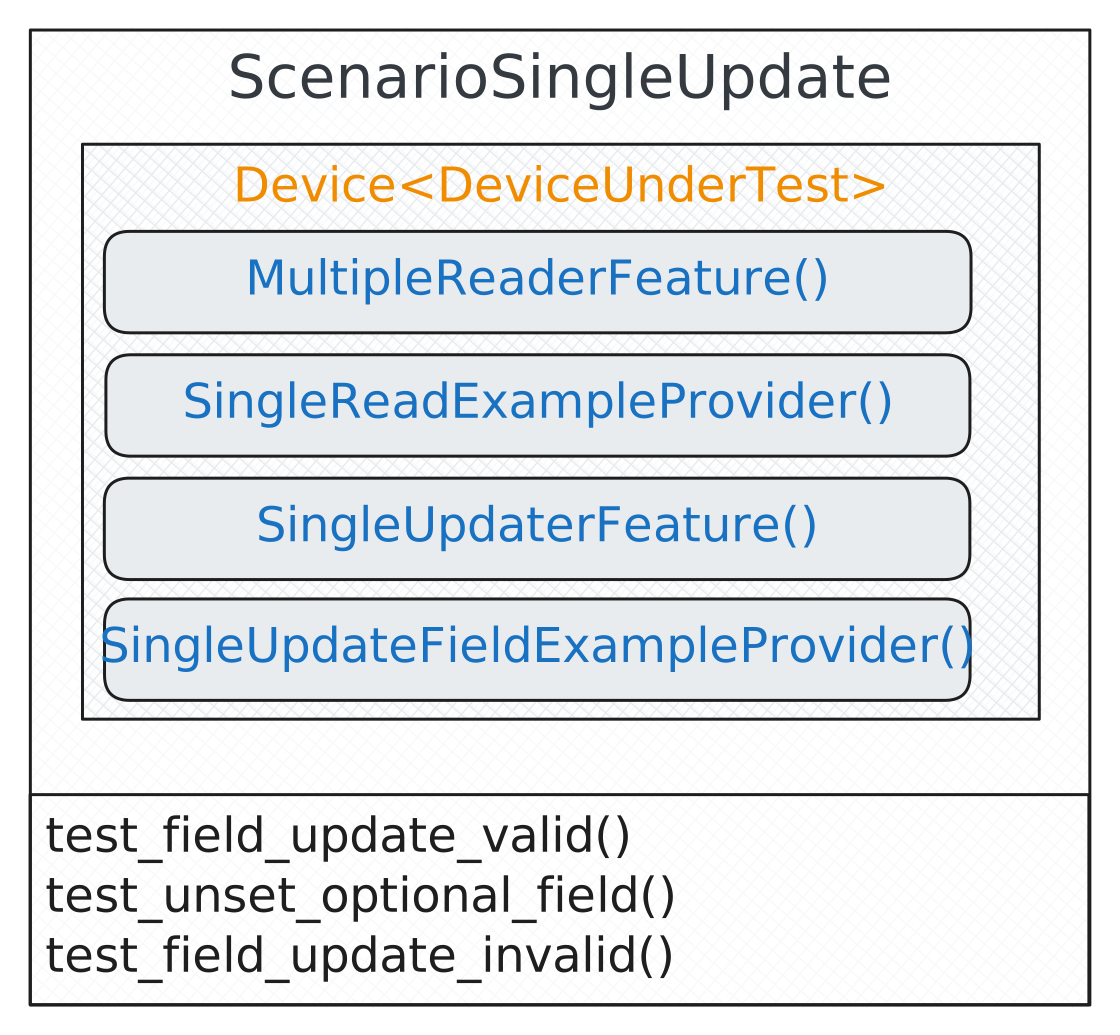
Scenario-Level-Feature |
Description / Setup-Level Feature Implementations |
|---|---|
Feature that updates an existing data item in the system under test If you need this feature for a common application (django-admin, rest, odoo, nextcloud, ..) refer to the Contributions/Implementations table table and look for an implementation of this feature in its contrib section. If you would like to use the ready-to-use scenario version of this
feature refer to Provide Custom Implementation of SingleUpdaterFeature
You can also build this feature from scratch, for that, have a look at the scenario-level implementation at
|
|
Feature that selects existing data items that should be updated This feature is available as a factory implementation on scenario level
( |
|
Feature that defines the new value that should be set for a field for a specific data item This feature normally need to define by yourself, it defines the values that should be used during updating. Have a look at Describing a SINGLE UPDATE FIELD EXAMPLE feature to see how this feature can be implemented. |
|
Feature allows to read back all data items from a specific type (used to check that updated one was created successfully) If you need this feature for a common application (django-admin, rest, odoo, nextcloud, ..) refer to the Contributions/Implementations table table and look for an implementation of this feature in its contrib section. If you would like to use the ready-to-use scenario version of this
feature refer to Provide Custom Implementation of MultipleReaderFeature
You can also build this feature from scratch, for that, have a look at the scenario-level implementation at
|
Example Setup:
import balder

import balderhub.data.lib.setup_features.factories
import balderhub.crud.lib.setup_features.factories

from tests.lib.setup_features.data import book
from tests.lib.utils.data_items import BookDataItem
from tests.lib.setup_features.data_environment_feature import TestDataEnvironment
from tests.lib.setup_features.dut_simulator_feature import DutSimulatorFeature


class SetupBook(balder.Setup):

    class Dut(balder.Device):
        sim = DutSimulatorFeature()
        env = TestDataEnvironment()
        initial_data = balderhub.data.lib.setup_features.factories.AutoInitialDataConfigFactory.get_for(BookDataItem)()

    @balder.connect(Dut, over_connection=balder.Connection)
    class Client(balder.Device):
        accessible_data = balderhub.data.lib.setup_features.factories.AutoAccessibleInitialDataConfigFactory.get_for(BookDataItem)(Master='Dut')
        multiple_reader = book.MultipleBookReader(Dut='Dut')
        updator = book.SingleBookUpdator(Dut='Dut')
        read_example = balderhub.crud.lib.setup_features.factories.AutoSingleReadExampleFactory.get_for(BookDataItem, return_style='first')()
        update_example = book.ExampleUpdateBookFieldProvider()
Note
This scenario is also available as Triangle version, see balderhub.crud.scenarios.ScenarioTriangleSingleUpdate.
SINGLE Delete
Note
This scenario is still under development.
MULTIPLE Create
Note
This scenario is still under development.
MULTIPLE Read
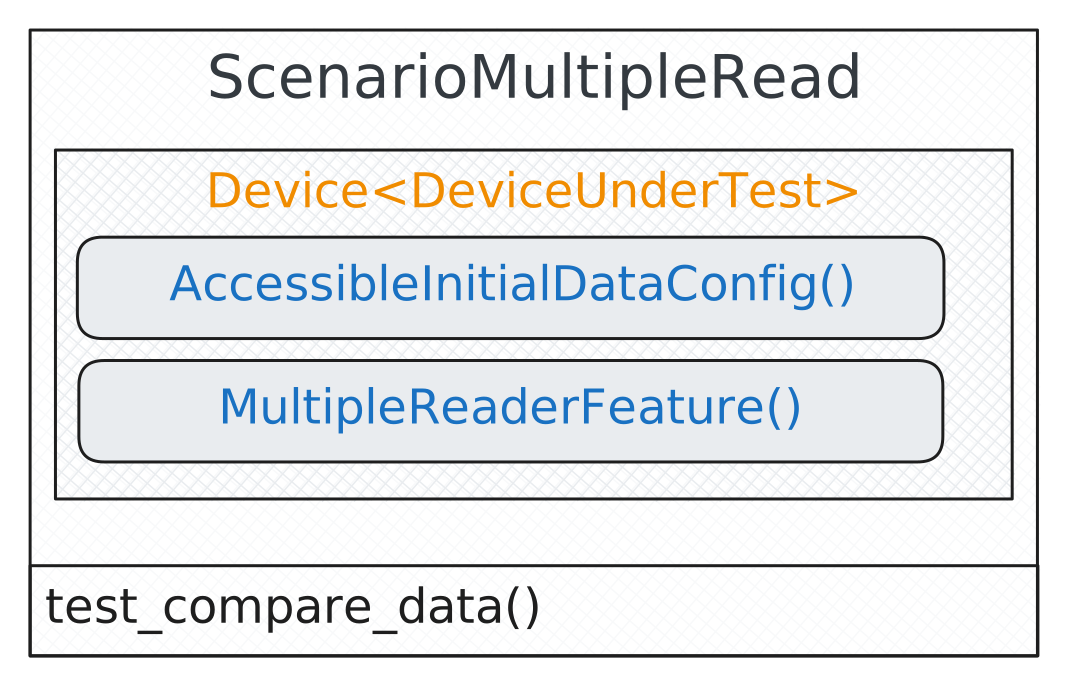
Scenario-Level-Feature |
Description / Setup-Level Feature Implementations |
|---|---|
Feature that reads all data items in the device under test If you need this feature for a common application (django-admin, rest, odoo, nextcloud, ..) refer to the Contributions/Implementations table table and look for an implementation of this feature in its contrib section. If you would like to use the ready-to-use scenario version of this
feature refer to Provide Custom Implementation of MultipleReaderFeature
You can also build this feature from scratch, for that, have a look at the scenario-level implementation at
|
|
Feature that describes the initial data that is accessible This feature is available as a factory implementation on scenario level (see: Scenario-Level AutoAccessibleInitialDataConfigFactory in the balderhub-data package). and on setup level (see: Setup-Level AutoAccessibleInitialDataConfigFactory in the balderhub-data package). level. If you do not have any specific requirements to the data item that is read (except the possibilities provided by the factory - like FIRST, LAST, RANDOM) you can use the setup version of this factory directly within your setup |
Example Setup:
import balder

import balderhub.data.lib.setup_features.factories
import balderhub.crud.lib.setup_features.factories

from tests.lib.setup_features.data import book
from tests.lib.utils.data_items import BookDataItem
from tests.lib.setup_features.data_environment_feature import TestDataEnvironment
from tests.lib.setup_features.dut_simulator_feature import DutSimulatorFeature


class SetupBook(balder.Setup):

    class Dut(balder.Device):
        sim = DutSimulatorFeature()
        env = TestDataEnvironment()
        initial_data = balderhub.data.lib.setup_features.factories.AutoInitialDataConfigFactory.get_for(BookDataItem)()

    @balder.connect(Dut, over_connection=balder.Connection)
    class Client(balder.Device):
        accessible_data = balderhub.data.lib.setup_features.factories.AutoAccessibleInitialDataConfigFactory.get_for(BookDataItem)(Master='Dut')
        multiple_reader = book.MultipleBookReader(Dut='Dut')
MULTIPLE Update
Note
This scenario is still under development.
MULTIPLE Delete
Note
This scenario is still under development.
Contributions/Implementations of this package
There are ready-to-use feature implementations for the CREATE/UPDATE/READ/DELETE features in other BalderHub packages. Refer to their CONTRIB documentation for how you can use these features.
Subproject |
Description |
Link DOC |
|---|---|---|
balderhub-django |
Ready To Use implementation for Django Admin - define a GeneralAdminModelConfig feature and some example picker features - everything else is already done |
|
balderhub-rest |
Ready To Use implementation for Default REST - define a GeneralRestModelConfig feature and some example picker features - everything else is already done |
|
balderhub-odoo (COMING SOON) |
Ready-to-use implementation for important Odoo models - describe your data environment and you’re ready to go |
|
balderhub-nextcloud (COMING SOON) |
Ready-to-use implementation for important Nextcloud models - describe your data environment and you’re ready to go |
If you would like to add your bindings to this table, feel free to reach out to us by creating an issue in balderhub-crud.
Specifying Data Features
Most BalderHub subpackages need a setup-level implementation of the balderhub.data.lib.scenario_features.InitialDataConfig and/or balderhub.data.lib.scenario_features.AccessibleInitialDataConfig features.
Option 1: Use DataEnvironmentFeature (RECOMMENDED)
The recommended solution is to define your own
balderhub-data DataEnvironmentFeature
by using factories for your specific data items. The balderhub-data package will automatically resolve the
requested data according to the parameter given to the factory. This way, you won’t need to provide your own
implementations of these data config features.
As described in the balderhub-data Example Guide, you can define the data environment by providing your own implementation of the balderhub-data DataEnvironmentFeature:
from balderhub.data.lib.scenario_features.data_environment_feature import DataEnvironmentFeature
from tests.lib.utils import data_items
from tests.lib.setup_features.dut_simulator_feature import DutSimulatorFeature
from tests.lib.utils.dut_simulator import DutSimulator


class TestDataEnvironment(DataEnvironmentFeature):

    sim = DutSimulatorFeature()

    def load_data(self):

        self._add_data(data_items.AuthorDataItem(id=1, first_name='J.K.', last_name='Rowling'))
        self._add_data(data_items.AuthorDataItem(id=2, first_name='J.R.R.', last_name='Tolkien'))
        self._add_data(data_items.AuthorDataItem(id=3, first_name='A.B.C.', last_name='Alphabet'))

        self._add_data(data_items.BookCategoryDataItem(id=1, name='Fantasy'))
        self._add_data(data_items.BookCategoryDataItem(id=2, name='Science Fiction'))
        self._add_data(data_items.BookCategoryDataItem(id=3, name='Action'))

        self._add_data(data_items.BookDataItem(
            id=1, title='Harry Potter and the Sorcerer’s Stone',
            author=self.get(data_items.AuthorDataItem, 1),
            category=self.get(data_items.BookCategoryDataItem, 1))
        )

        self._add_data(data_items.BookDataItem(
            id=2, title='Harry Potter and the Order of the Phoenix',
            author=self.get(data_items.AuthorDataItem, 1),
            category=self.get(data_items.BookCategoryDataItem, 1))
        )

        self._add_data(data_items.BookDataItem(
            id=3, title='The Hobbit',
            author=self.get(data_items.AuthorDataItem, 2),
            category=self.get(data_items.BookCategoryDataItem, 1))
        )

    def sync_environment(self):
        """Triggers data synchronization when the remote data needs to be synced"""
        self.sim.dut_simulator.remove_all()

        for cur_author in self.get_all_for(data_items.AuthorDataItem):
            self.sim.dut_simulator._all_authors[cur_author.id] = DutSimulator.Author(
                id=cur_author.id, first_name=cur_author.first_name, last_name=cur_author.last_name
            )

        for cur_category in self.get_all_for(data_items.BookCategoryDataItem):
            self.sim.dut_simulator._all_categories[cur_category.id] = DutSimulator.Category(
                id=cur_category.id, name=cur_category.name
            )

        for cur_book in self.get_all_for(data_items.BookDataItem):
            self.sim.dut_simulator._all_books[cur_book.id] = DutSimulator.Book(
                id=cur_book.id, title=cur_book.title, author__id=cur_book.author.id, category__id=cur_book.category.id
            )
If you then want to use the data defined within your DataEnvironmentFeature, you can use the already implemented
feature factories
balderhub.data.lib.setup_features.factories.AutoInitialDataConfigFactory and
balderhub.data.lib.setup_features.factories.AutoAccessibleInitialDataConfigFactory
from the balderhub-data package, like shown below:
class SetupAuthor(balder.Setup):

    class DUT(balder.Device):
        data = TestDataEnvironment()
        initial_data = balderhub.data.lib.setup_features.factories.AutoInitialDataConfigFactory.get_for(AuthorDataItem)()
        ...

    @balder.connect(DUT, over_connection=balder.Connection)
    class User(balder.Device):
        accessible_data = balderhub.data.lib.setup_features.factories.AutoAccessibleInitialDataConfigFactory.get_for(AuthorDataItem)(Master='DUT')
Option 2: Describe the InitialDataConfig features manually (NOT RECOMMENDED)
Alternatively you can overwrite the InitialDataConfig/AccessibleInitialDataConfig features and define the expected data for a specific data item manually.
import balderhub.data.lib.scenario_features
from balderhub.data.lib.utils.single_data_item_collection import SingleDataItemCollection


class MyBookInitialDataConfig(balderhub.data.lib.scenario_features.factories.AutoInitialDataConfigFactory.get_for(BookDataItem)):

    @property
    def data_list(self) -> SingleDataItemCollection:
        author_1 = data_items.AuthorDataItem(id=1, first_name='J.K.', last_name='Rowling')
        author_2 = data_items.AuthorDataItem(id=2, first_name='J.R.R.', last_name='Tolkien')

        category = data_items.BookCategoryDataItem(id=1, name='Fantasy')


        data = SingleDataItemCollection()
        data(data_items.BookDataItem(
            id=1, title='Harry Potter and the Sorcerer’s Stone',
            author=author_1,
            category=category
        )

        data(data_items.BookDataItem(
            id=2, title='Harry Potter and the Order of the Phoenix',
            author=author_1,
            category=category
        )

        data(data_items.BookDataItem(
            id=3, title='The Hobbit',
            author=author_2,
            category=category
        )

        return data
Note
Do not forget to decorate this feature with the data item type or use the factory to get the related scenario level feature like shown within the example.
You can use this within your setup like shown below:
class MyFilter(balderhub.data.lib.utils.filter.Filter):
    ...

class SetupBook(balder.Setup):

    class DUT(balder.Device):
        data = TestDataEnvironment()
        initial_data = MyBookInitialDataConfig()
        ...

    @balder.connect(DUT, over_connection=balder.Connection)
    class User(balder.Device):
        accessible_data = balderhub.data.lib.setup_features.factories.AutoAccessibleInitialDataConfigFactory.get_for(BookDataItem, filter_func=MyFilter)(Master='DUT')
Defining EXAMPLE PROVIDER features
Example Provider features often need to be defined for a test environment, because these provider features specify which data should be tested and for which data which error messages should appear.
Describing a new SINGLE CREATE EXAMPLE feature
Create a subclass of SingleCreateExampleProvider. The feature must
supply one or more data items that will be used for the creation test (valid cases, invalid cases, edge cases, etc.).
Typical implementation pattern (example for authors):
from __future__ import annotations

import balderhub.data
from balderhub.data.lib.utils import NOT_DEFINABLE, ResponseMessageList, ResponseMessage

import balderhub.crud.lib.scenario_features


from ....utils.data_items import AuthorDataItem


@balderhub.data.register_for_data_item(AuthorDataItem)
class ExampleCreateAuthorProvider(balderhub.crud.lib.scenario_features.SingleCreateExampleProvider):

    def get_valid_examples(
            self
    ) -> list[balderhub.crud.lib.scenario_features.SingleCreateExampleProvider.NamedExample]:
        return [
            self.NamedExample(
                name='Simple Author',
                data_item=AuthorDataItem(id=NOT_DEFINABLE, first_name='Sam', last_name='Miller'),
                expected_response_messages=ResponseMessageList([])
            )
        ]

    def get_invalid_examples(
            self
    ) -> list[balderhub.crud.lib.scenario_features.SingleCreateExampleProvider.NamedExample]:
        return [
            self.NamedExample(
                name='Author with empty first name',
                data_item=AuthorDataItem(id=NOT_DEFINABLE, first_name='', last_name='Miller'),
                expected_response_messages=ResponseMessageList(
                    [ResponseMessage(text='The author needs a first name.')]
                )
            ),
            self.NamedExample(
                name='Author with empty last name',
                data_item=AuthorDataItem(id=NOT_DEFINABLE, first_name='Sam', last_name=''),
                expected_response_messages=ResponseMessageList(
                    [ResponseMessage(text='The author needs a last name.')]
                )
            )
        ]
You can then assign it in your setup as shown in the SINGLE Create example above.
Describing a SINGLE UPDATE FIELD EXAMPLE feature
Create a subclass of SingleUpdateFieldExampleProvider. This feature
defines which field(s) of an existing data item should be changed and what the new value(s) should be.
Typical implementation pattern (example for authors):
from __future__ import annotations
from typing import Any

import balderhub.data
from balderhub.data.lib.utils import ResponseMessageList, ResponseMessage
import balderhub.crud.lib.scenario_features

from .example_create_author_provider import ExampleCreateAuthorProvider
from ....utils.data_items import AuthorDataItem


@balderhub.data.register_for_data_item(AuthorDataItem)
class ExampleUpdateAuthorFieldProvider(balderhub.crud.lib.scenario_features.SingleUpdateFieldExampleProvider):

    read_example = balderhub.crud.lib.scenario_features.factories.AutoSingleReadExampleFactory.get_for(AuthorDataItem)()

    def get_valid_new_value_for_field(self, field: str) -> Any:
        return [
            self.NamedExample(
                name="Changed Name",
                data_item=self.read_example.get_first_valid_example().data_item,
                field_name=field,
                new_field_value='Chalana'
            )
        ]

    def get_invalid_new_value_for_field(self, field: str) -> Any:
        if field == 'first_name':
            return [
                self.NamedExample(
                    name="Empty Firstname",
                    data_item=self.read_example.get_first_valid_example().data_item,
                    field_name=field,
                    new_field_value='',
                    expected_response_messages=ResponseMessageList(
                        [ResponseMessage(text='The author needs a first name.')]
                    )
                )
            ]

        if field == 'last_name':
            return [
                self.NamedExample(
                    name="Empty Lastname",
                    data_item=self.read_example.get_first_valid_example().data_item,
                    field_name=field,
                    new_field_value='',
                    expected_response_messages=ResponseMessageList(
                        [ResponseMessage(text='The author needs a last name.')]
                    )
                )
            ]
        return []
You can then assign it in your setup as shown in the SINGLE Update example above. The scenario
will automatically combine the selected original item (from the
SingleReadExampleProvider) with the field updates you
provide.
Using Setup-Level Implementations of CRUD Features
This package already provides a setup-level implementation of the CRUD features. They are based on field-callbacks, which are objects that describe how a single field value is collected or filled in. Many BalderHub packages provide implementations for these objects. The following table shows some of them:
Subproject |
Description |
Link DOC |
|---|---|---|
|
Ready-to-use field callbacks for filling/collecting data from HTML elements |
|
|
Ready-to-use field callbacks for filling/collecting data in REST API requests/responses |
|
|
||
|
||
|
||
If you would like to add your bindings to this table, feel free to reach out to us by creating an issue in balderhub-crud.
It is strongly recommended to use these ready-implemented field callbacks, when working with such technologies. You can find out more about them in their documentation section.
All of these features use an own property item_mapping that should return a dictionary with the assigned
field-callbacks per field name. For nested items, you can use the
balderhub.crud.lib.utils.field_callbacks.Nested object like shown in the examples below.
Most of the features define the methods get_active_success_messages and get_active_error_messages, that should
return the currently visible error messages at the time the property is accessed.
Provide Custom Implementation of MultipleReaderFeature
import balder
import balderhub.data

from balderhub.crud.lib.utils.field_callbacks import FieldCollectorCallback, Nested

import balderhub.crud.lib.setup_features

from ...dut_simulator_feature import DutSimulatorFeature
from ....utils import data_items
from ....utils.grab_from_dict_callback import GrabFromDictCallback


@balderhub.data.register_for_data_item(data_items.BookDataItem)
class MultipleBookReader(balderhub.crud.lib.setup_features.MultipleReaderFeature):

    class Dut(balder.VDevice):
        sim = DutSimulatorFeature()

    def __init__(self, **kwargs):
        super().__init__(**kwargs)
        self._elements = None

    def load(self):
        return list(self.Dut.sim.dut_simulator.get_all_books())

    def get_list_item_element_container(self) -> list[data_items.BookDataItem]:
        return self._elements

    def item_mapping(self) -> dict[str, FieldCollectorCallback]:
        return {
            'id': GrabFromDictCallback(),
            'title': GrabFromDictCallback(),
            'author': Nested(
                id=GrabFromDictCallback(),
                first_name=GrabFromDictCallback(),
                last_name=GrabFromDictCallback(),
            ),
            'category': Nested(
                id=GrabFromDictCallback(),
                name=GrabFromDictCallback(),
            )

        }
Provide Custom Implementation of SingleCreatorFeature
from __future__ import annotations
from typing import List, Dict, Union, Any

import balder
import balderhub.data

from balderhub.data.lib.utils import ResponseMessageList, ResponseMessage

from balderhub.crud.lib.setup_features import SingleCreatorFeature
from balderhub.crud.lib.utils import UNSET
from balderhub.crud.lib.utils.field_callbacks import FieldFillerCallback, Nested

from tests.lib.setup_features.dut_simulator_feature import DutSimulatorFeature
from tests.lib.utils.data_items import BookDataItem
from tests.lib.utils.inject_into_dict_callback import InjectIntoDictCallback


@balderhub.data.register_for_data_item(BookDataItem)
class SingleBookCreator(SingleCreatorFeature):

    class Dut(balder.VDevice):
        sim = DutSimulatorFeature()

    def __init__(self, **kwargs):
        super().__init__(**kwargs)

        self._data: Union[dict[str, Any], None] = None
        self._last_exception = None

    def load(self):
        self._data = {}

    def get_non_fillable_fields(self) -> List[str]:
        return [
            'id',
            *BookDataItem.get_all_fields_for('author', except_fields=['id']),
            *BookDataItem.get_all_fields_for('category', except_fields=['id']),
        ]

    def get_element_container(self) -> dict[str, Any]:
        return self._data

    def item_mapping(self) -> Dict[str, FieldFillerCallback]:
        return {
            'title': InjectIntoDictCallback(),
            'author': Nested(
                id=InjectIntoDictCallback()
            ),
            'category': Nested(
                id=InjectIntoDictCallback(),
                _unset_callback=InjectIntoDictCallback()
            )
        }

    def save(self):
        self._last_exception = None
        if self._data is None:
            raise ValueError("No filled data")

        try:
            self.Dut.sim.dut_simulator.add_book(**{k: v for k, v in self._data.items() if v != UNSET})
            self._data = None
        except Exception as e:
            self._last_exception = e

    def get_expected_error_message_for_missing_mandatory_field(
            self,
            data: dict[str, Any],
            without_mandatory_field: str
    ) -> ResponseMessageList:
        return ResponseMessageList([ResponseMessage(
            f"DutSimulator.add_book() missing 1 required positional argument: '{without_mandatory_field}'")])

    def get_active_success_messages(self) -> ResponseMessageList:
        return ResponseMessageList()

    def get_active_error_messages(self) -> ResponseMessageList:
        return ResponseMessageList([ResponseMessage(self._last_exception.args[0])] if self._last_exception else [])
Provide Custom Implementation of SingleReaderFeature
from typing import Any

import balder

import balderhub.data.lib.setup_features.factories

from balderhub.crud.lib.setup_features import SingleReaderFeature
from balderhub.crud.lib.utils.field_callbacks import FieldCollectorCallback, Nested

from tests.lib.setup_features.dut_simulator_feature import DutSimulatorFeature
from tests.lib.utils import data_items
from tests.lib.utils.grab_from_dict_callback import GrabFromDictCallback


@balderhub.data.register_for_data_item(data_items.BookDataItem)
class SingleBookReader(SingleReaderFeature):

    class Dut(balder.VDevice):
        dut = DutSimulatorFeature()

    def __init__(self, **kwargs):
        super().__init__(**kwargs)
        self._loaded_data = None

    def load(self, unique_identification_value: Any):
        return self.Dut.dut.dut_simulator.get_book(unique_identification_value)

    def get_element_container(self) -> data_items.BookDataItem:
        return self._loaded_data

    def item_mapping(self) -> dict[str, FieldCollectorCallback]:
        return {
            'id': GrabFromDictCallback(),
            'title': GrabFromDictCallback(),
            'author': Nested(
                id=GrabFromDictCallback(),
                first_name=GrabFromDictCallback(),
                last_name=GrabFromDictCallback(),
            ),
            'category': Nested(
                id=GrabFromDictCallback(),
                name=GrabFromDictCallback(),
            )
        }
Provide Custom Implementation of SingleUpdaterFeature
from __future__ import annotations
from typing import Any, List, Dict, Union

import balder
import balderhub.data

from balderhub.data.lib.setup_features import factories
from balderhub.data.lib.utils import ResponseMessageList, ResponseMessage, NOT_DEFINABLE

from balderhub.crud.lib.setup_features import SingleUpdaterFeature
from balderhub.crud.lib.utils.field_callbacks import FieldFillerCallback, Nested

from tests.lib.setup_features.dut_simulator_feature import DutSimulatorFeature
from tests.lib.utils.data_items import BookDataItem
from tests.lib.utils.inject_into_dict_callback import InjectIntoDictCallback


@balderhub.data.register_for_data_item(BookDataItem)
class SingleBookUpdator(SingleUpdaterFeature):

    class Dut(balder.VDevice):
        sim = DutSimulatorFeature()

    def __init__(self, **kwargs):
        super().__init__(**kwargs)

        self._id_to_update = None
        self._data: Union[dict[str, Any], None] = None
        self._last_exception = None

    def load(self, unique_identification_value: Any, **kwargs):
        self._data = {}
        self._id_to_update = unique_identification_value

    def get_non_fillable_fields(self) -> List[str]:
        return [
            'id',
            *BookDataItem.get_all_fields_for('author', except_fields=['id']),
            *BookDataItem.get_all_fields_for('category', except_fields=['id']),
        ]

    def get_element_container(self) -> dict[str, Any]:
        return self._data

    def item_mapping(self) -> Dict[str, FieldFillerCallback]:
        return {
            'title': InjectIntoDictCallback(),
            'author': Nested(
                id=InjectIntoDictCallback()
            ),
            'category': Nested(
                id=InjectIntoDictCallback(),
                _unset_callback=InjectIntoDictCallback()
            )
        }

    def save(self):
        self._last_exception = None
        if self._data is None:
            raise ValueError("No filled data")

        try:
            self.Dut.sim.dut_simulator.update_in_book(with_id=self._id_to_update, data_to_update=self._data)
            self._data = None
            self._id_to_update = None
        except Exception as e:
            self._last_exception = e

    def get_active_success_messages(self) -> ResponseMessageList:
        return ResponseMessageList()

    def get_active_error_messages(self) -> ResponseMessageList:
        return ResponseMessageList([ResponseMessage(self._last_exception.args[0])] if self._last_exception else [])