Utilities
This section shows general objects and helper functions that are used with this package.
Data Environment Mixin
- class balderhub.django.lib.utils.DataEnvironmentForDjangoMixin
Bases:
objectMixin class designed to integrate data environment functionalities with Django. It should be used as a Mixin when creating custom
balderhub.data.lib.scenario_features.DataEnvironmentFeaturefor django environments, because this class provides method for loading data from Django fixtures and much more.This class provides methods to work with Django fixtures and retrieve information about primary key field mappings for various data item types. It enables the loading of data from Django-style YAML fixtures while providing tools for ignoring specific fields, mapping field types, and resolving nested or list data structures.
- get_pk_field_name_of(data_item_type: type[balderhub.data.lib.utils.single_data_item.SingleDataItem]) str
Retrieve the primary key field name for the specified data item type.
This method determines the primary key (PK) field name for a given data item type by checking if the PK_FIELDS attribute is a single string or a dictionary mapping data item types to their corresponding PK field names.
- Parameters:
data_item_type – The data item type for which to retrieve the primary key field name.
- Returns:
The primary key field name corresponding to the given data item type.
- load_from_django_fixture(fixture_path: PathLike | str, data_obj_type: type[balderhub.data.lib.utils.single_data_item.SingleDataItem], ignore_fields: list[str] | None = None, type_mapping: dict[str, Callable[[Any], Any]] | None = None, encoding: str = 'utf-8') list[balderhub.data.lib.utils.single_data_item.SingleDataItem]
Loads data from a Django-style YAML fixture and converts it into a list of objects of the specified data_obj_type.
The function processes YAML fixture files structured with primary keys, fields, and optional nested or list fields. It applies transformations to data fields using an optional mapping function, ignores specified fields, and ensures compatibility with nested data classes.
- Parameters:
fixture_path – Path to the YAML fixture file.
data_obj_type – The data class type to map the fixture data to.
ignore_fields – A list of field names to exclude from the loaded data. Defaults to None.
type_mapping – A dictionary mapping field names to converter functions for transforming field values in the fixture data. Defaults to None.
encoding – The character encoding used to read the fixture file. Defaults to ‘utf-8’.
- Returns:
A list of instances of data_obj_type created from the fixture data.
GUI Elements
General Admin HTML Element
Bases:
HtmlElementBase container representing the footer section of a Django admin page.
- class balderhub.django.lib.utils.gui.admin.BaseHeaderContainer(bridge: BaseWebdriverElementBridge)
Bases:
HtmlElementBase container representing the header section of a Django admin page.
- class balderhub.django.lib.utils.gui.admin.BaseMainContentContainer(bridge: BaseWebdriverElementBridge)
Bases:
HtmlElementBase container representing the main content section of a Django admin page.
- class balderhub.django.lib.utils.gui.admin.BreadcrumbsContainer(bridge: BaseWebdriverElementBridge)
Bases:
HtmlDivElementContainer representing the breadcrumbs navigation bar in a Django admin page.
- get_items_as_texts() list[str]
Returns a list of breadcrumb item texts split by the separator.
- get_links() list[balderhub.html.lib.utils.components.html_anchor_element.HtmlAnchorElement]
Returns a list of all breadcrumb anchor link elements.
- class balderhub.django.lib.utils.gui.admin.ChangeListCellElement(bridge: BaseWebdriverElementBridge)
Bases:
HtmlTablecellElementElement representing a single cell in a Django admin change list result table.
- class balderhub.django.lib.utils.gui.admin.ChangeListColumnHeader(bridge: BaseWebdriverElementBridge)
Bases:
HtmlTablecellElementElement representing a column header in a Django admin change list result table.
- class balderhub.django.lib.utils.gui.admin.ChangeListFilter(bridge: BaseWebdriverElementBridge)
Bases:
HtmlElementElement representing a single filter section in the Django admin change list filter sidebar.
- get_choices() list[balderhub.html.lib.utils.components.html_anchor_element.HtmlAnchorElement]
Returns a list of all filter choice anchor elements.
- property h3_title: HtmlElement
Returns the filter title heading element.
- class balderhub.django.lib.utils.gui.admin.ChangeListFilterSidebar(bridge: BaseWebdriverElementBridge)
Bases:
HtmlDivElementContainer representing the filter sidebar on a Django admin change list page.
- get_filters() list[balderhub.django.lib.utils.gui.admin.change_list_filter.ChangeListFilter]
Returns a list of all filter sections in the sidebar.
- property h2_title: HtmlElement
Returns the sidebar title heading element.
- class balderhub.django.lib.utils.gui.admin.ChangeListResultRow(bridge: BaseWebdriverElementBridge)
Bases:
HtmlTablerowElementElement representing a single result row in a Django admin change list table.
- property a_link: HtmlAnchorElement
Returns the anchor link element of this row.
- property checkbox: HtmlElement
Returns the action select checkbox element.
- property checkbox_action: HtmlCheckboxInput
Returns the action checkbox input element.
- get_cell_for(django_identifier: str) ChangeListCellElement
Retrieve an HTML table cell element corresponding to the given Django field identifier.
This method locates a specific table cell within the current row based on the provided Django field identifier.
- Parameters:
django_identifier – The Django field identifier used to locate the specific cell.
- Returns:
An HTML table cell element associated with the given Django field identifier.
- get_cells() list[balderhub.django.lib.utils.gui.admin.change_list_cell_element.ChangeListCellElement]
Returns a list of all cell elements in this row.
- class balderhub.django.lib.utils.gui.admin.ChangeListResultTable(bridge: BaseWebdriverElementBridge)
Bases:
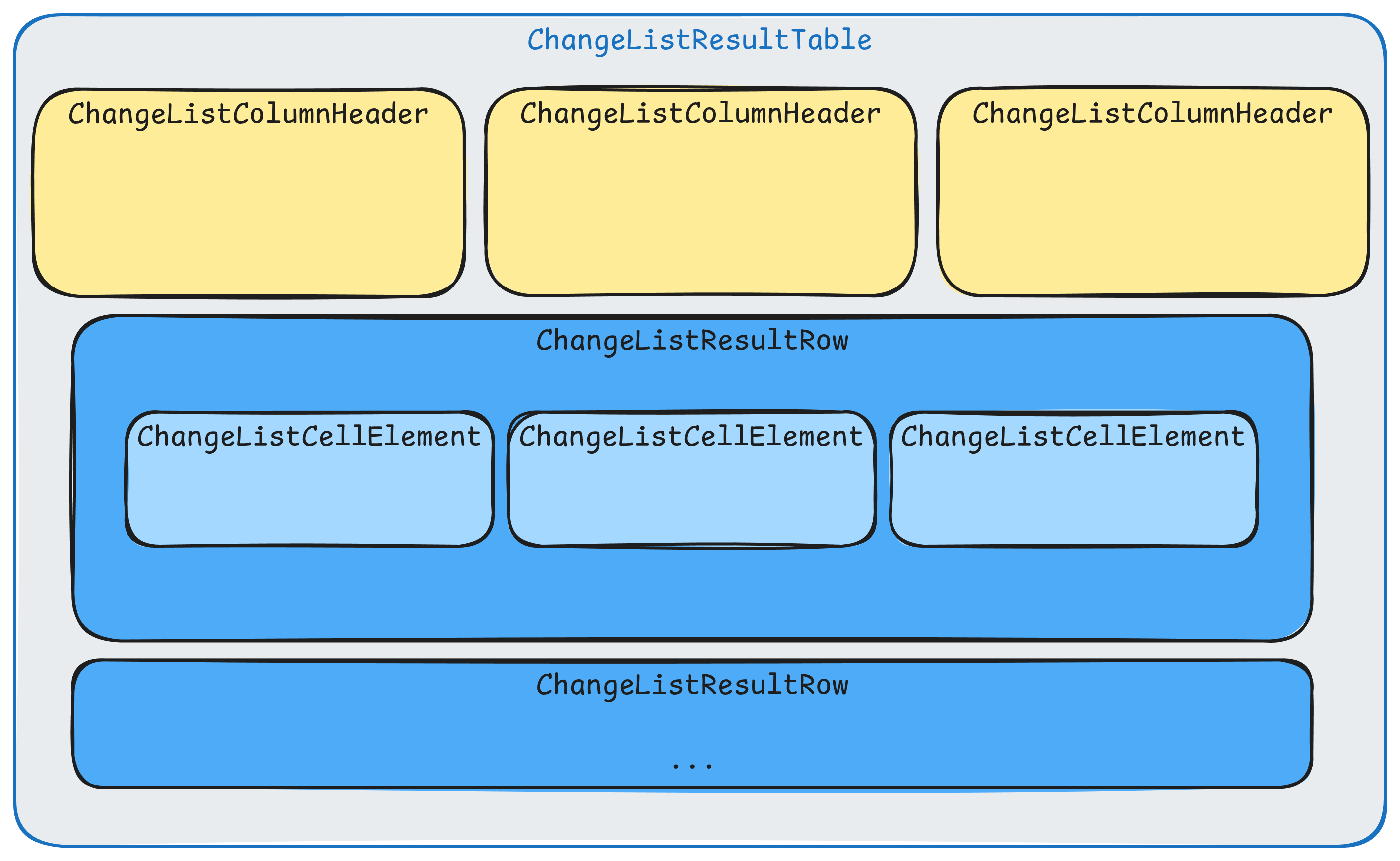
HtmlTableElementElement representing the result table on a Django admin change list page.
This container element is implemented according the following structure:
- get_all_visible_columns_for(field: str) list[balderhub.django.lib.utils.gui.admin.change_list_cell_element.ChangeListCellElement]
Returns a list of all visible cell elements for the given field name across all rows.
- get_header_cells() list[balderhub.html.lib.utils.components.html_tablecell_element.HtmlTablecellElement]
Returns a list of all header cell elements in the table.
- get_row_at(index: int) ChangeListResultRow
Returns the result row at the given index.
- get_rows() list[balderhub.django.lib.utils.gui.admin.change_list_result_row.ChangeListResultRow]
Returns a list of all result row elements in the table body.
- get_table_cell_for(field: str, index: int) ChangeListCellElement
Returns the cell element for the given field name and row index.
- get_table_column_header_for(field: str) ChangeListColumnHeader
Returns the column header element for the given field name.
- class balderhub.django.lib.utils.gui.admin.DefaultAdminHeaderContainer(bridge: BaseWebdriverElementBridge)
Bases:
BaseHeaderContainerContainer representing the default Django admin header with site name, user tools and theme toggle.
- property btn_change_password
Returns the ‘Change password’ anchor link element.
- property btn_logout
Returns the ‘Log out’ button element.
- property btn_site_name
Returns the site name anchor link element.
- property btn_theme_toggle
Returns the theme toggle button element.
- property btn_view_site
Returns the ‘View site’ anchor link element.
- property span_username
Returns the span element displaying the logged-in username.
- class balderhub.django.lib.utils.gui.admin.HtmlSelect2GlobalList(bridge: BaseWebdriverElementBridge)
Bases:
HtmlDivElementRepresents the global HTML Select2 dropdown element (usually used for autocomplete fields) with enhanced features for managing and interacting with the searchable items.
This class is a wrapper for handling Select2 dropdown components within django admin applications. It provides convenient methods for interacting with the search input field, retrieving visible items, and performing operations on list items based on their text content.
- get_element_by_text(text: str) HtmlSpanElement
This method returns a specific span element by the given visible text
- Parameters:
text – the visible text
- Returns:
the specific html span element
- get_visible_items() List[Tuple[int, str]]
- Returns:
returns all visible items in form of their id and their visible text
- property input_search
- Returns:
the raw html search input field
- class balderhub.django.lib.utils.gui.admin.MainModuleContainer(bridge: BaseWebdriverElementBridge)
Bases:
HtmlDivElementContainer representing an application module on the Django admin index page.
- property a_caption
Returns the caption anchor link element of this module.
- get_all_models()
Returns a list of all model row elements within this module.
- class balderhub.django.lib.utils.gui.admin.ChangeFormContainer(bridge: BaseWebdriverElementBridge)
Bases:
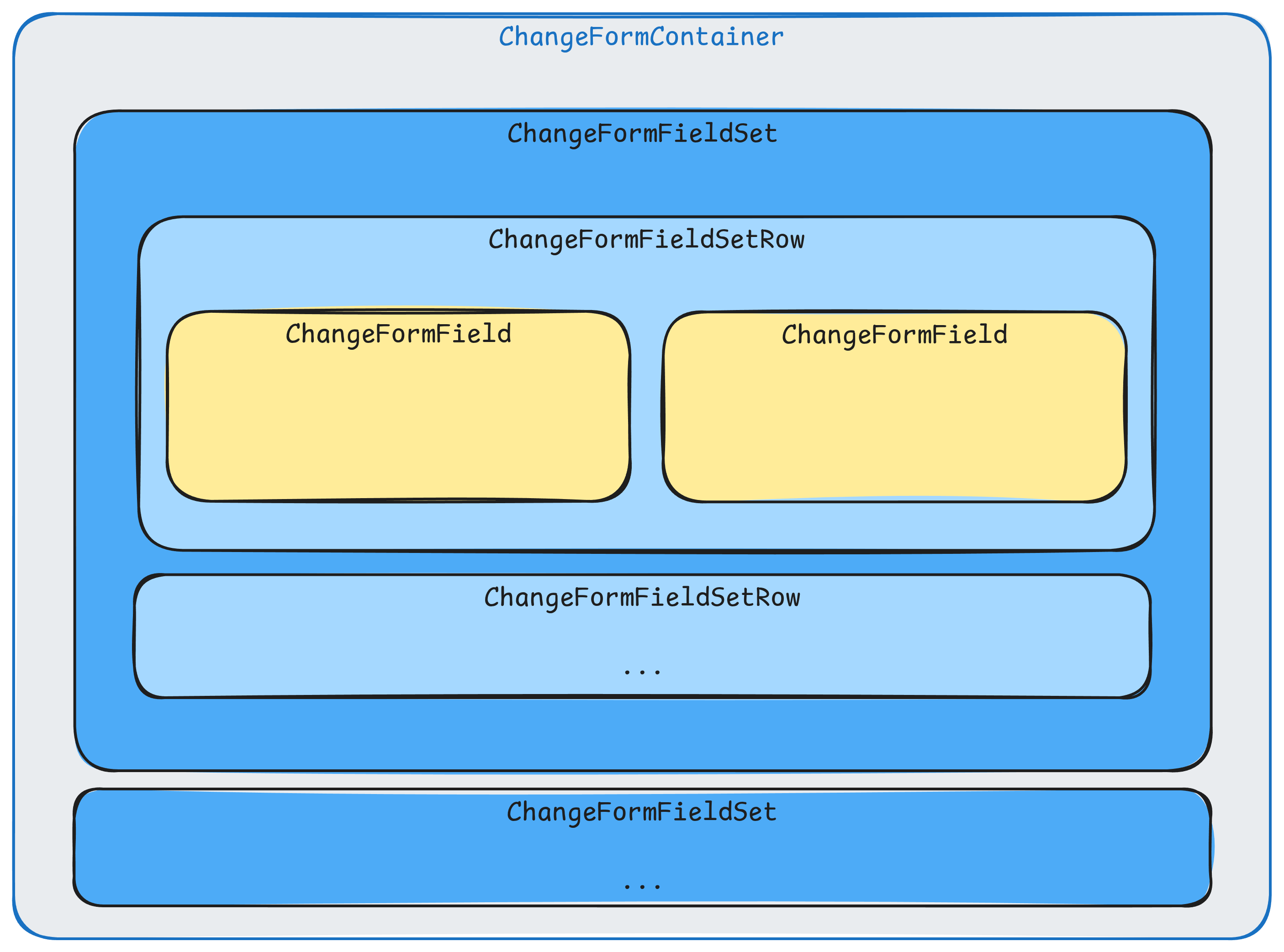
HtmlFormElementContainer representing the main form element on a Django admin change form page.
This container element is implemented according the following structure:
- get_all_fieldsets() list[balderhub.django.lib.utils.gui.admin.change_form_fieldset.ChangeFormFieldset]
Returns a list of all fieldset containers within the form.
- get_all_form_field_containers() list[balderhub.django.lib.utils.gui.admin.change_form_fields.base_change_form_field.BaseChangeFormField]
Returns a list of all form field containers within the form.
- get_all_visible_field_errors() ResponseMessageList
Retrieves all visible field error messages from all form field containers.
This method iterates through all form field containers and collects their visible error messages into a single ResponseMessageList object.
- Returns:
A list containing all visible error messages from the form field containers.
- get_form_field_container_for(django_identifier: Any) BaseChangeFormField
Returns the form field container for a specific given Django identifier.
- property submit_row: ChangeFormSubmitRow
Returns the submit row container with save, delete and other action buttons.
- class balderhub.django.lib.utils.gui.admin.ChangeFormFieldset(bridge: BaseWebdriverElementBridge)
Bases:
HtmlElementContainer representing a single fieldset within a Django admin change form.
- get_all_rows() list[balderhub.django.lib.utils.gui.admin.change_form_fieldset_row.ChangeFormFieldsetRow]
Returns a list of all form rows within this fieldset.
- class balderhub.django.lib.utils.gui.admin.ChangeFormSubmitRow(bridge: BaseWebdriverElementBridge)
Bases:
HtmlDivElementContainer representing the submit row with action buttons on a Django admin change form.
- property a_delete: HtmlAnchorElement
Returns the delete link element.
- property btn_save: HtmlButtonElement
Returns the ‘Save’ button element.
- property btn_save_and_add_another: HtmlButtonElement
Returns the ‘Save and add another’ button element.
- property btn_save_and_continue: HtmlButtonElement
Returns the ‘Save and continue editing’ button element.
- class balderhub.django.lib.utils.gui.admin.MessageElement(bridge: BaseWebdriverElementBridge)
Bases:
HtmlLiElementRepresents a Message element in an HTML document.
This class wraps django message objects or alerts and provides additional functionality to determine and manage the “level” of the message. The level corresponds to its severity or type, such as debug, info, success, warning, or error.
- class MessageLevel(value)
Bases:
EnumRepresents different levels of messages defined by django.
- ERROR = 'error'
An action was not successful or some other failure occurred
- INFO = 'info'
Informational messages for the user
- SUCCESS = 'success'
An action was successful, e.g. “Your profile was updated successfully”
- WARNING = 'warning'
A failure did not occur but may be imminent
- property level: MessageLevel
Retrieves the message level associated with the HTML element represented by the bridge.
- Raises:
ValueError – If there is not exactly one MessageLevel class within the HTML element.
- Returns:
The message level corresponding to the HTML element.
Admin HTML Widgets
- class balderhub.django.lib.utils.gui.admin.widgets.HtmlSelect2AutocompleteSelect(bridge: BaseWebdriverElementBridge)
Bases:
HtmlSpanElementRepresents an HTML select element with autocompletion functionality.
This class extends the HtmlSpanElement to provide behavior specific to HTML select elements using Select2 for dropdown and autocompletion. It allows interaction with dropdown items and retrieval of possible options.
- get_all_possibilities() List[Tuple[int, str]]
Generates and retrieves all possible combinations of ID-value pairs from a global select list that becomes visible upon interaction.
- Returns:
A list of tuples, where each tuple contains an integer ID with the item id and its visible text as string value.
- get_global_select2_list() HtmlSelect2GlobalList
Retrieves the global Select2 dropdown list using the driver and a specific HTML selector. This method utilizes a predefined selector to locate and return the desired Select2 dropdown element encapsulated within a HtmlSelect2GlobalList object.
- Returns:
An instance of HtmlSelect2GlobalList identified by the specified selector using the provided driver.
- select(text: str) None
Selects an item from a dropdown list by its text.
This method simulates clicking on a dropdown element, waits for it to load, retrieves the list of available options, and selects the item that matches the specified text.
- Parameters:
text – The display text of the item to select from the dropdown.
- class balderhub.django.lib.utils.gui.admin.widgets.ManyToManySelectorWidget(bridge: BaseWebdriverElementBridge)
Bases:
HtmlDivElementWidget representing the many-to-many selector with available and chosen sides in a Django admin form.
- class OneSideSelectorContainer(bridge: BaseWebdriverElementBridge)
Bases:
HtmlDivElementContainer representing one side (available or chosen) of the many-to-many selector widget.
- property input_selector_filter: HtmlTextInput
Returns the filter text input element.
- property select: HtmlSelectElement
Returns the select element containing the options.
- property btn_arrow_add: HtmlAnchorElement
Returns the arrow button element for adding selected items.
- property btn_arrow_remove: HtmlAnchorElement
Returns the arrow button element for removing selected items.
- property btn_choose_all: HtmlAnchorElement
Returns the ‘Choose all’ anchor link element.
- property btn_choose_none: HtmlAnchorElement
Returns the ‘Clear all’ anchor link element.
- property div_available_selector: OneSideSelectorContainer
Returns the available options selector container.
- property div_chosen_selector: OneSideSelectorContainer
Returns the chosen options selector container.
Admin Change-Form-Fields HTML Element
- class balderhub.django.lib.utils.gui.admin.change_form_fields.BaseChangeFormField(bridge: BaseWebdriverElementBridge)
Bases:
HtmlElementBase element representing a single field container within a Django admin change form fieldset row.
- property div_help: HtmlDivElement | None
Returns the help text div element, or None if not present.
- property errorlist: HtmlUlElement | None
Retrieves the error list element for the current context.
The method searches for an unordered list (
ul.errorlist) containing validation errors in the web page. The search behavior adapts based on the presence or absence of a specific Django field name associated with the current instance. If the field name is unavailable within the current scope, it searches within the parent context. Additionally, it implements a workaround for certain Django-generated HTML structures by checking for error lists in the immediate parent element.- Returns:
An instance of
html.HtmlUlElementrepresenting the error list if found, otherwiseNone.
- property field: HtmlElement
Returns the field input element. Must be implemented by subclasses.
- get_all_visible_field_errors() ResponseMessageList
Fetches all visible field error messages and returns them as a ResponseMessageList. This method retrieves errors from the error list of the field and formats them into a consumable list of AdminFieldErrorMessage objects.
- Returns:
A list of field error messages retrieved from the error list of the field. Returns an empty ResponseMessageList if no errors are present.
- get_django_field_name()
Retrieves the Django field name associated with the current element or its parent.
This method first attempts to determine the Django field name from the current element’s class attributes. If unsuccessful, it examines the parent element’s class attribute to infer the field name. If multiple or no field names are detected from the parent, an exception is raised.
- Raises:
ValueError – If a field name cannot be uniquely detected, either because no corresponding field class is found or multiple field names are inferred from the parent element.
- Returns:
The associated Django field name.
- property label
Returns the label element for this field.
- class balderhub.django.lib.utils.gui.admin.change_form_fields.DateChangeFormField(bridge: BaseWebdriverElementBridge)
Bases:
BaseChangeFormFieldField container for date input fields in a Django admin change form.
- property btn_open_calendar: HtmlAnchorElement
Returns the anchor link element that opens the calendar widget.
- property btn_shortcut_today: HtmlAnchorElement
Returns the ‘Today’ shortcut anchor link element.
- property field: HtmlDateInput
Returns the date input element.
- class balderhub.django.lib.utils.gui.admin.change_form_fields.ForeignKeyChangeFormField(bridge: BaseWebdriverElementBridge)
Bases:
BaseChangeFormFieldField container for foreign key select fields in a Django admin change form.
- property btn_add: HtmlAnchorElement
Returns the ‘Add related’ anchor link element.
Returns the ‘Change related’ anchor link element.
- property btn_delete: HtmlAnchorElement
Returns the ‘Delete related’ anchor link element.
Returns the ‘View related’ anchor link element.
- property field: HtmlSelectElement
Returns the foreign key select element.
- class balderhub.django.lib.utils.gui.admin.change_form_fields.InputChangeFormField(bridge: BaseWebdriverElementBridge)
Bases:
BaseChangeFormFieldField container for standard input fields in a Django admin change form.
- property field: HtmlTextInput
Returns the input element.
- class balderhub.django.lib.utils.gui.admin.change_form_fields.M2MChangeFormField(bridge: BaseWebdriverElementBridge)
Bases:
BaseChangeFormFieldField container for many-to-many selector fields in a Django admin change form.
- property btn_add: HtmlAnchorElement
Returns the ‘Add related’ anchor link element.
- property field: ManyToManySelectorWidget
Returns the many-to-many selector widget element.
- property label
Returns the label element for this field.
- class balderhub.django.lib.utils.gui.admin.change_form_fields.TextareaChangeFormField(bridge: BaseWebdriverElementBridge)
Bases:
BaseChangeFormFieldField container for textarea fields in a Django admin change form.
- property field: HtmlTextareaElement
Returns the textarea element.
Response-Messages
- class balderhub.django.lib.utils.response_messages.AdminFieldErrorMessage(field: str, message: str)
Bases:
BaseResponseMessageRepresents an error message associated with a specific field.
This class is used to describe validation errors or issues associated with a specified field in a request or response. It provides details regarding the field name and the expected validation message.
- field: str
The name of the field(s) associated with the error.
- message: str
The message conveying the details of the expected validation or error.
- class balderhub.django.lib.utils.response_messages.AdminGlobalErrorNote(message: str)
Bases:
BaseResponseMessageRepresents a global error message.
This class is used to encapsulate and provide a format for global error messages provided within the django admin interface.
- message: str
The error message represented as a string.
- class balderhub.django.lib.utils.response_messages.AdminGlobalMessage(message: str, level: Literal['error', 'warning', 'info', 'debug', 'success'])
Bases:
BaseResponseMessageRepresents a global error message.
This class is used to encapsulate and provide a format for global error messages provided within the django admin interface.
- message: str
The error message represented as a string.
Utility Functions
- balderhub.django.lib.utils.functions.parse_datetime_according_formats(value: str, date_formats: list[str]) datetime
Parses a date string into a datetime object using a list of possible date formats.
This function iterates through the provided list of date formats and attempts to parse the given date string. If successful, it returns the parsed datetime.datetime object. If none of the formats can parse the date string, a ValueError is raised.
- Parameters:
value – The date string to be parsed.
date_formats – A list of date format strings used to attempt parsing the date string.
- Returns:
A datetime.datetime object parsed from the date string.
- Raises:
ValueError – If the date string does not match any of the supplied formats.
- balderhub.django.lib.utils.functions.parse_date_according_formats(value: str, date_formats: list[str]) date
Parses a given date string based on a list of date formats and returns a datetime.date object corresponding to the given value. This function utilizes the provided formats sequentially until a successful match is found or raises an appropriate error if parsing fails.
- Parameters:
value – The string representation of the date to parse.
date_formats – A list of date format strings to attempt when parsing the given value.
- Returns:
A datetime.date object representing the parsed date.
- balderhub.django.lib.utils.functions.get_django_field_names_from_html_class_attribute(class_attribute: str) list[str]
Extracts Django field names from a given HTML class attribute string.
This function takes an HTML class attribute string, identifies components representing Django form fields (indicated by a prefix of “field-“), and returns a list of the corresponding field names without the “field-” prefix.
- Parameters:
class_attribute – A string representing an HTML class attribute, which may contain one or more classes, some of which might represent Django form fields.
- Returns:
A list of Django field names extracted from the input class attribute string.